
Approval Workflows That Scale: Automations for Innovation Governance10 min read

Innovation governance often creates the bottlenecks it was designed to prevent.
When approval processes run through email chains and manual handoffs, decisions stall, visibility disappears, and no one can tell who’s responsible for what.
Structure and transparency in approvals require active infrastructure: routing logic, escalation reminders, and audit trails.
These three mechanics are the difference between a governance process that holds up under volume and one that consistently stalls.
Why Manual Approval Processes Break at Scale
Manual approval workflows fail in predictable ways once volume increases. Ideas enter a queue with no visibility on where they are or when they’ll be reviewed.
Approvers hold decisions in email inboxes with no SLA and no escalation path when someone is out or overwhelmed.
No record exists of why something was approved or declined, making it impossible to learn from patterns or defend decisions later.
The data shows this clearly:
- Only just 4% of businesses have fully automated workflows, despite 40% of finance professionals citing automation as a top priority.
- Approval processing time historically ran up to one week, though consolidation and automation have compressed this to hours in leading organizations.
- Knowledge workers spend 30% of their working time searching for information, much of it chasing status updates on pending approvals.
For innovation programs, this gap is particularly costly. Ideas lose traction when approval timelines stretch unpredictably.
Teams grow skeptical of the process when decisions appear arbitrary or when reviewers apply different criteria to similar submissions.
And at scale, inconsistency tends to compound rather than correct itself.
Process infrastructure is the problem:
- Email inboxes were never designed to handle structured workflows.
- Human memory alone can’t track SLAs across dozens of pending items.
- Spreadsheets can’t route decisions intelligently or escalate when someone is unavailable.
These tools were built for communication, not coordination.
The Three Mechanics That Make Approval Workflows Scale
Well-designed approval automation rests on three structural pillars: routing logic, escalation reminders backed by SLAs, and complete audit trails.
Together, they form the foundation of any approval process that can handle volume without losing transparency or speed.
Routing Logic
Routing determines who reviews what and in what order.
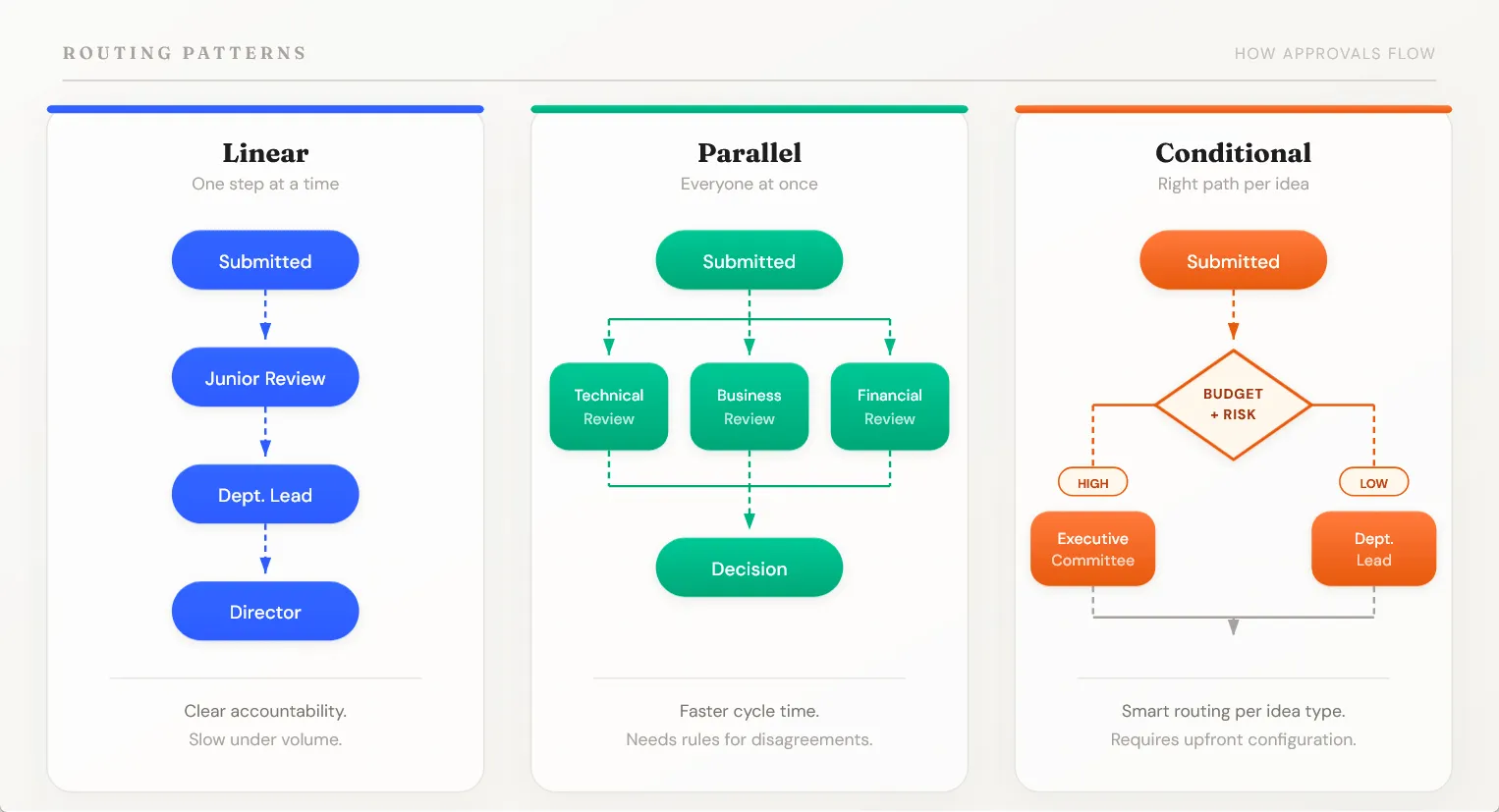
Most organizations start with linear routing: approvals move sequentially through a defined hierarchy.
- A junior reviewer recommends.
- A department lead reviews.
- A director makes the final call.
But linear routing serializes decisions. Each step waits for the previous one to finish.
So most teams end up using a mix of routing patterns depending on the decision:
| Routing Type | How It Works | Trade-off |
|---|---|---|
| Linear | Sequential approval through a defined chain | Clear accountability, but slow at volume |
| Parallel | Multiple reviewers evaluate simultaneously | Faster, but needs escalation rules for disagreements |
| Conditional | Approval path changes based on business rules (budget, risk, category) | Handles complexity, but requires upfront configuration |
Here’s the design principle that matters most across all three: route by role, not by individual.
A process that routes to “John in R&D” breaks when John takes vacation. A process that routes to “R&D Lead” continues seamlessly.
Role-based routing also prevents political routing (favoring approvers most likely to say yes) and keeps decisions distributed fairly.
Conditional routing deserves special attention because it handles the complexity that innovation programs typically face.
Ideas in different categories require different approval paths:
- Research-stage ideas might need scientific review but not financial approval.
- Market-facing products need go-no-go decisions from product and commercial teams.
A well-designed conditional workflow routes each idea to the appropriate reviewers without manual triage.
Escalation Reminders
An approval sitting in someone’s inbox with no due date and no reminder? It eventually becomes someone else’s problem.
Escalation reminders fix this by establishing time-based triggers that escalate unprogressed items up the approval chain.
- Set an SLA window (24 to 48 hours is standard).
- Send an automated reminder as that window approaches.
- If the original approver hasn’t acted by the deadline, the system escalates to the next level automatically.
Escalation doesn’t remove the item from the original approver. A more senior reviewer gains visibility and can either approve themselves or send it back for input.
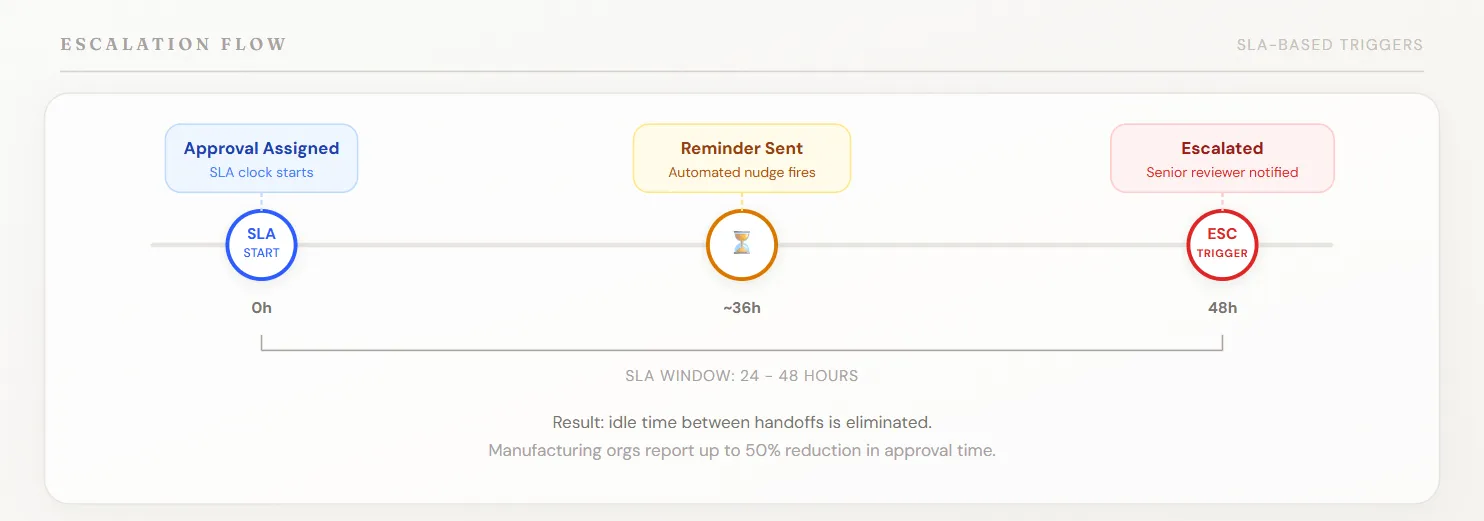
A manufacturing organization that implemented escalation automation reported a 50% reduction in approval time. Escalation eliminates the lag that happens when requests sit unaddressed.
For innovation programs on calendar-driven timelines, this matters. Innovation cycles have hard deadlines: portfolio reviews, quarterly planning, board presentations.
Losing days to stalled approvals directly threatens program outcomes.
Audit Trails
Every approval decision creates a time-stamped, role-attributed log entry.
- Who reviewed this idea?
- When did they review it?
- What decision did they make?
- What was their reasoning?
An audit trail captures all of this.
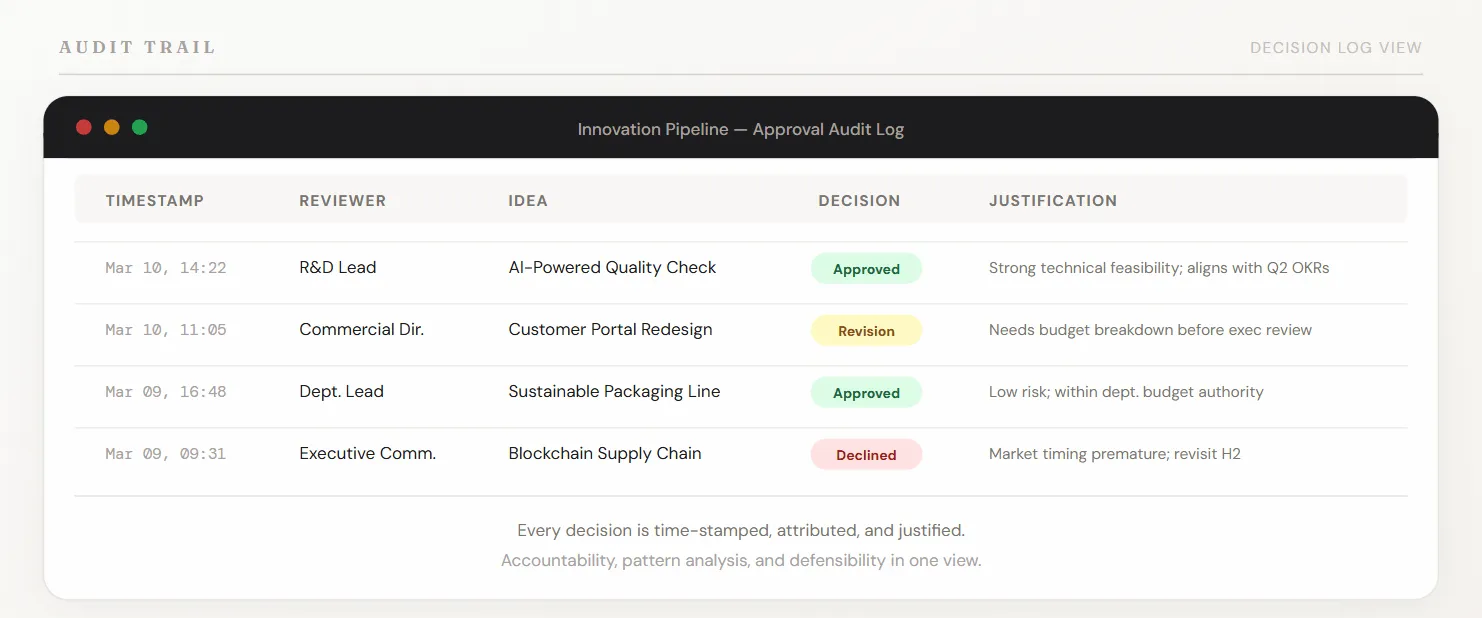
Audit trails serve three practical purposes:
- Accountability: decisions are recorded and attributable, not deniable.
- Pattern analysis: you can see which ideas are getting stuck and which reviewers are consistent bottlenecks.
- Defensibility: you can explain to leadership or external parties exactly why an idea was approved or declined.
A complete audit log entry typically captures:
| Field | Purpose |
|---|---|
| Timestamp | Establishes decision timeline and SLA compliance |
| Reviewer Role | Ensures appropriate authority made the decision |
| Decision | What was the outcome (approved, rejected, revision requested) |
| Justification/Notes | Why this decision was made; what criteria the reviewer applied |
| Attachments | Scoring rubrics, evaluation forms, or other supporting evidence |
Without this record, decisions become deniable:
- Approvers claim they never saw a particular idea.
- Declining teams believe decisions were arbitrary.
- Leadership can’t assess whether the approval process itself is the bottleneck or whether ideas genuinely don’t meet criteria.
An audit trail transforms governance from a potential liability into evidence of disciplined decision-making.
Three Governance Failure Modes That Automation Fixes
Most approval workflow failures tend to fall into three categories, and all three are addressable through structured automation.
The Inbox Bottleneck
Approvals land in email with no SLA, no visibility to the requester, and no escalation mechanism.
Approvers get overwhelmed, items slip through the cracks, and by the time someone follows up, days have passed.
Look, email was never designed for structured workflow management. It has no native concept of SLA, no escalation rules, no dashboard to show what’s currently pending.
Automation replaces this with centralized visibility, time-based reminders, and escalation logic that surfaces stuck items before they become problems.
The “Who Decided This?” Gap
A discussion happens in Slack or in person.
Someone says “we should go with idea X.” No one documents why. Weeks later, when the decision is questioned or when new information surfaces, the reasoning is lost.
Audit trails create a required record: every decision lives in a system of record with attached justification.
Audit trails enable organizational learning. You can’t improve your decision-making process if you don’t know what criteria you were actually applying.
The Consistency Problem
Different reviewers apply different standards to similar ideas.
- One approver prioritizes feasibility; another prioritizes market impact.
- Some require detailed business cases; others decide on a one-page summary.
Inconsistent criteria breed fairness concerns, create rework, and prevent learning.
Structured workflows with clear approval criteria and standardized decision templates enforce consistency without removing judgment.
All three failure modes share a common root: the process wasn’t designed for volume. The process is the lever.
Governance Designed to Move Decisions Forward
Well-designed governance accelerates decisions. Yet many organizations treat governance as purely a control mechanism: more checkpoints, more approvals, more caution.
The Lean Governance principle addresses this directly: centralize only what requires senior judgment, automate the rest.
Decisions vary in complexity and risk, and the approval process should reflect that.
Decision tiers clarify this:
- Strategic decisions (full committee review): Ideas that touch core business strategy, require significant capital, or introduce new risk categories.
- Operational decisions (department lead approval): Ideas within defined scope and budget that affect a single team or business line.
- Routine decisions (role-based auto-routing): Ideas that meet clear, predetermined criteria and don’t require judgment.
When you tier decisions correctly, you protect what needs protection and accelerate what can move fast.
This produces measurable outcomes: organizations using standardized funnels and improved governance see 25-30% faster implementation of innovation projects.
That speed comes from applying the right level of rigor to the right decisions. Now, AI-assisted scoring at the intake stage amplifies this further.
Before ideas reach the formal approval queue, AI can surface high-potential candidates and flag obvious misalignments with strategy or technical constraints.
This reduces the evaluation burden and keeps human reviewers focused on genuine judgment calls.
Building the Workflow Infrastructure in Practice
Here’s the thing: approval workflow automation doesn’t require rearchitecting your entire governance model.
Start with your highest-pain point: where do approvals consistently stall, and why?
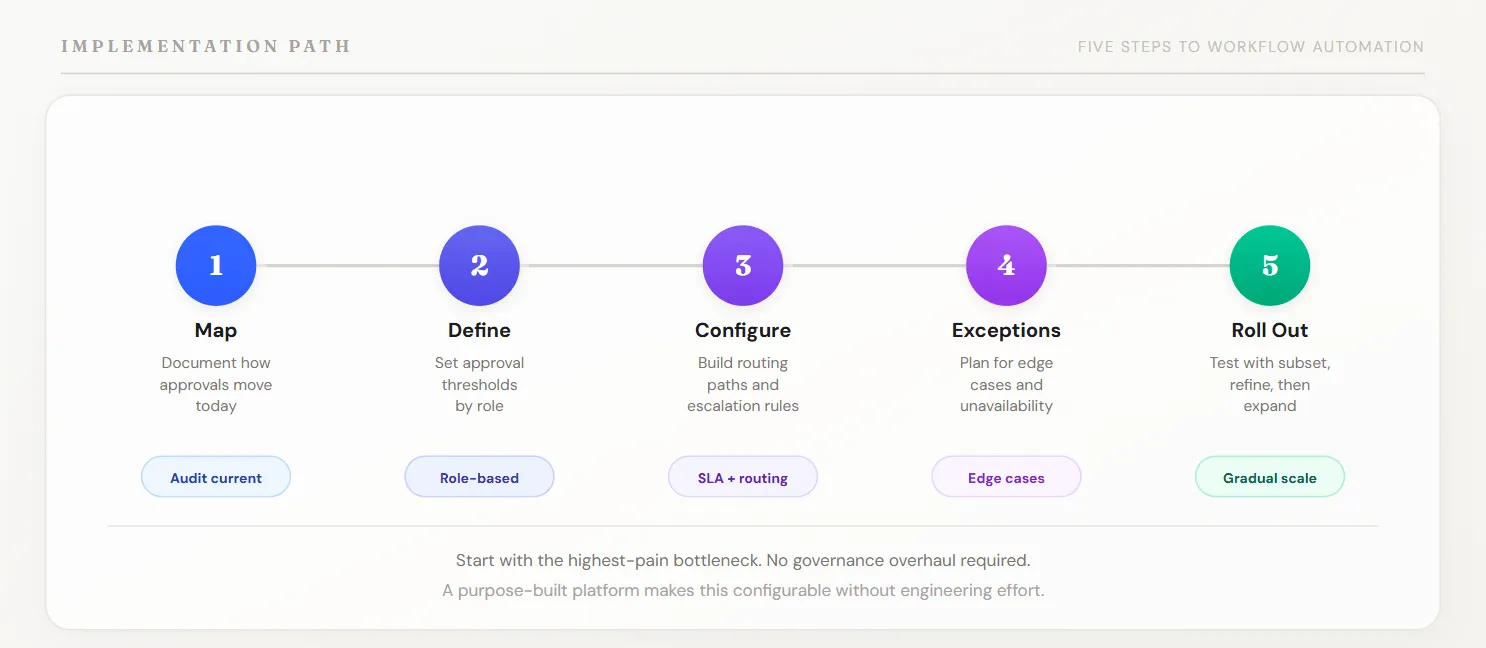
A practical five-step implementation path:
- Map the current process. Document how approvals actually move today. Which steps are manual? Where do requests get stuck most often? Where do you see rework or inconsistent decisions?
- Define approval thresholds by role. Don’t route to John; route to “R&D Lead” or “Commercial Director.” Assign decision authority by role and define the thresholds (budget, risk level, strategic importance) that determine who decides what.
- Configure routing and escalation. Build the approval paths based on your decision tiers. Set SLA windows. Define escalation rules for items that don’t progress. Use conditional logic to route different types of ideas to appropriate reviewers.
- Build exception handling. What happens when an approver is unavailable? When a decision requires input from someone outside the standard chain? When an item needs urgent review? Plan these exceptions explicitly rather than letting them become ad hoc workarounds.
- Test and gradually roll out. Start with a high-volume, lower-risk approval type. Test the workflow with a subset of users. Refine based on feedback. Then expand to other approval types.
This setup doesn’t require custom software development.
A purpose-built innovation management platform makes this configurable without engineering effort for each new campaign or approval type.
You define the rules once; the system enforces them consistently.
Start With the Bottleneck, Then Build Out
Most organizations don’t need to redesign their entire governance model. Find the single place where approvals consistently stall and automate that first.
Targeted improvements make the biggest difference:
- A central dashboard with pending items sorted by SLA urgency eliminates hours of status-hunting.
- Automated reminders and escalation get decisions unstuck before deadlines pass.
- Audit trails answer questions that otherwise require email archaeology.
These are targeted fixes that let your approval process do what it was designed to do. Structure and transparency are what let governance scale. Speed follows from that.
Ready to stop losing ideas to approval queues that no one monitors?
Download our ebook on innovation governance, or book a demo to see how Accept Mission handles automated routing, escalation workflows, and audit trails.



 English
 Dutch
Dutch Portuguese
 Spanish
 French
 German
 Arabic