
 Doc Summary
Why this feature is needed #
When a funnel contains many ideas, teams need a quick way to identify which ideas still need attention and which ideas already have stronger evaluation results. Without this overview, reviewing and prioritizing ideas can take more time than necessary.
The Idea score filter helps power users and admins work faster by grouping ideas based on their scoring state and score level directly in the funnel. This supports review, follow-up, and prioritization without opening ideas one by one.
What this feature is #
Idea score is a funnel-level score view that helps users filter ideas based on how they are scored. It is available in the funnel filters panel and can be used to quickly separate ideas that are already scored from ideas that are not scored yet.
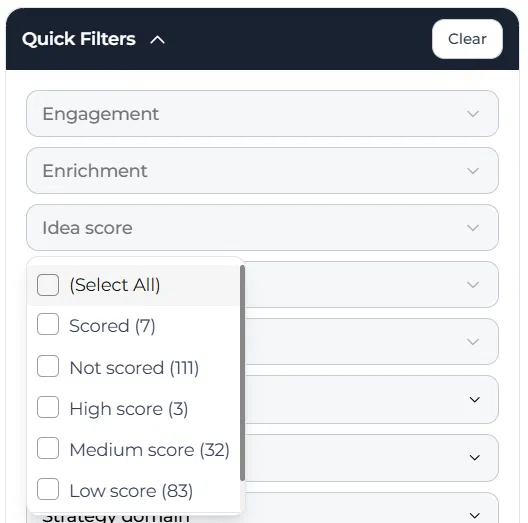
Within the Idea score filter, ideas can be grouped into Select all, Scored, Not scored, High score, Medium score, and Low score. This makes it easier to review funnel progress and focus on the right ideas during evaluation and selection.
This feature is used directly from the funnel view, so you do not need to open individual ideas to use it.
Access level #
You need access to the relevant funnel in the Innovation Studio to use the Idea score filter.
Navigation path #
Navigation path: Innovation Studio → Funnels → Open funnel → Filters
How to use this feature #
The Idea score filter is used from inside the funnel. It helps you focus on ideas by scoring status and score range, so you can quickly see which ideas still need scoring and which ideas already stand out based on their current score.
This is useful during scoring rounds, shortlist preparation, and review meetings where you want to work with a selected set of ideas instead of the full funnel.
Step by step instructions #
- Open Innovation Studio.
- Go to Funnels.
- Open the funnel you want to review.
- Click Filters.
- In the filters panel, open Idea score.
- Select one of the available filter options: Select all, Scored, Not scored, High score, Medium score, or Low score.
- Review the filtered set of ideas in the funnel.
- Adjust the filter when you want to switch between scoring states or score levels.
Available filter options #
Select all #
Shows all ideas in the funnel regardless of scoring status or score level.
Scored #
Shows only ideas that already have a score.
Not scored #
Shows ideas that still need scoring. This is useful as a practical to-do list during review.
High score #
Shows ideas with a high Idea score. This can help identify stronger ideas for further evaluation or selection.
Medium score #
Shows ideas with a medium Idea score. This can help identify ideas that may need more discussion or enrichment.
Low score #
Shows ideas with a low Idea score. This can help identify ideas that may be less likely to move forward or may need review before a Decision is made.
How this helps in funnel management #
The Idea score filter is useful when you want to manage funnel progress without opening every idea individually. It helps reviewers quickly see how much scoring work is still open and which ideas already have stronger or weaker scoring outcomes.
This makes the funnel easier to manage during enrichment, scoring, shortlist preparation, and Decision-making sessions.
Configuration and adjustments #
The Idea score filter is available directly in the funnel filters panel. It does not require separate setup in the funnel view itself, but it depends on the scoring structure that is configured for the funnel.
If ideas are not being grouped as expected, review the funnel Scorecard and the centralized Scorecard setup under Settings → Data and structures → Scorecards. The quality and completeness of scoring affect how useful the Idea score filter will be in practice.
Use this filter together with other funnel filters when you want to narrow the review to a very specific set of ideas, such as one Lane, one owner, or one tag combined with a score range.
Practical example – Innovationlands #
Innovationlands is reviewing ideas in its New attractions funnel before the monthly selection meeting. The innovation team wants to quickly see which ideas still need scoring and which ideas already stand out.
The reviewer opens the funnel, clicks Filters, and expands Idea score. First, they use Not scored to identify ideas that still need evaluation. After completing that review round, they switch to High score to see which attraction concepts currently have the strongest evaluation results.
This allows Innovationlands to prepare the shortlist more efficiently and focus the next Decision meeting on the ideas that are already scored and most likely to move forward.



 English
 Dutch
Dutch Portuguese
 Spanish
 French
 German
 Arabic