
 Doc Summary
Why this feature is needed #
Innovation does not stop at idea evaluation. Once an idea is validated and approved, it must move into execution. This feature ensures a structured transition from idea management to project portfolio management.
Without this connection, ideas would remain isolated from execution, making it difficult to track outcomes, allocate resources, and manage progress. This feature creates continuity from Decision to delivery.
What this feature is #
This feature allows users to convert an approved idea into a project directly from the idea detail view. The newly created project is automatically linked to the original idea and transferred into the project portfolio.
Relevant data such as properties, configuration, and structured content like canvases are carried over to the project. This ensures that execution starts with all necessary context already in place.
The idea and project remain connected, allowing users to navigate between them and maintain traceability across the innovation lifecycle. This supports the end-to-end continuity of the platform from idea to execution. :contentReference[oaicite:0]{index=0}
Access level #
Users must have permissions to manage ideas and create projects within the project portfolio.
Navigation path #
Navigation path: Innovation Studio → Ideas → Idea details
How to use this feature #
When an idea reaches a stage where it is approved for execution, it can be converted into a project. This action creates a new project in the project portfolio and links it to the originating idea.
The system ensures that important data is transferred and that both objects remain connected for traceability and governance.
Step by step instructions #
- Go to Innovation Studio.
- Open Ideas from the left navigation.
- Select an idea that is ready to move into execution.
- Open the idea to access the Idea details page.
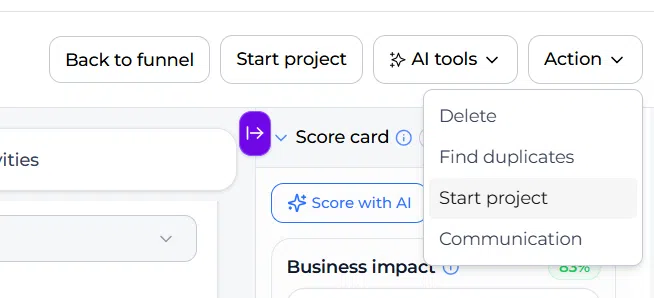
- Click the Action button, then Start project in the top right corner.
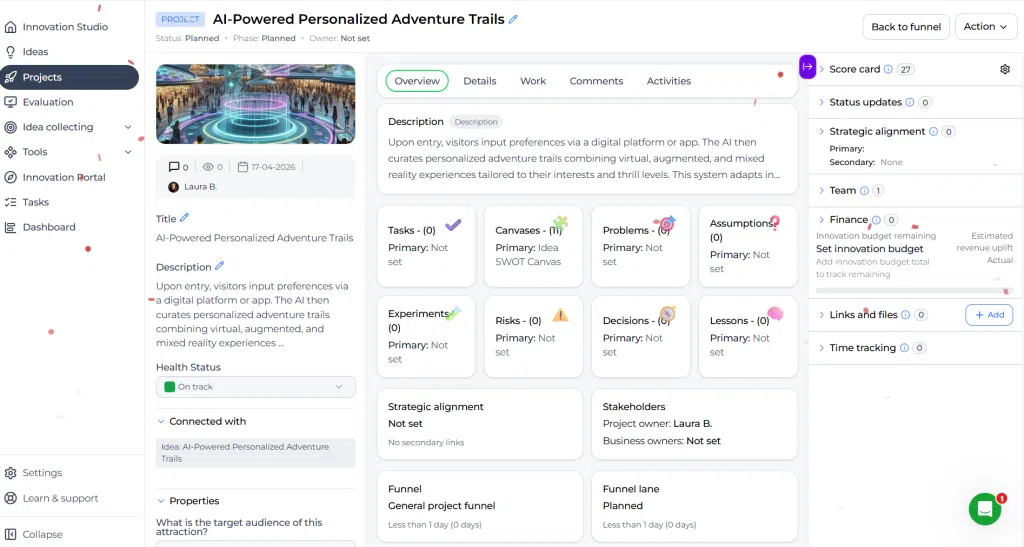
- The system creates a new project and opens it immediately.
- Review the project details and confirm the selected project funnel.
- Adjust or complete any essential fields if needed.
What happens automatically #
- A new project is created in the project portfolio
- The idea and project are linked to each other
- Properties (properties) are copied to the project
- Configuration settings are transferred
- Relevant canvas data is pre-filled when applicable
- The project is placed in a project funnel
Configuration and adjustments #
Default project funnel selection #
Each idea funnel can have a default project funnel configured. This determines where new projects are created by default.
If no manual changes are made, the system uses this predefined funnel when starting a project.
Manual funnel selection #
After creating the project, users can change the project funnel manually:
- Open the created project
- Go to the project details
- Select a different project funnel if needed
This is especially relevant when multiple project portfolios exist across departments or strategic domains.
Rich text properties when converting an idea to a project #
Rich text Property values are part of the structured information that can transfer from an idea to its linked project, provided the corresponding Property is available in the project context.
Example: A rich text Customer Problem Property containing a formatted Problem statement and a research link can remain available after an approved idea is converted into a project. Numeric properties such as expected impact and estimated effort can transfer alongside it for planning and execution.
Data continuity and governance #
The system maintains a permanent link between the idea and the project. This ensures:
- Traceability from idea to execution
- Alignment with strategic decisions
- Clear ownership and accountability
Practical example – Innovationlands #
At Innovationlands, a park team submits an idea to reduce waiting times by providing real-time queue insights to visitors.
The idea moves through the idea funnel where it is enriched, scored, and aligned with the strategic domain “Guest journey design”. After evaluation, the idea is approved.
The innovation lead opens the idea and clicks Start project. A new project is created in the project portfolio under the default project funnel for guest experience initiatives.
All relevant properties such as target audience, expected impact, and department ownership are transferred. The SWOT canvas used during idea enrichment is also available in the project.
The project team can immediately begin execution, defining milestones and tracking progress. The original idea remains linked, allowing stakeholders to trace how the initiative originated and why it was prioritized.
This ensures a structured transition from idea validation to execution within the innovation portfolio.



 English
 Dutch
Dutch Portuguese
 Spanish
 French
 German
 Arabic