
 Doc Summary
Why this feature is needed #
When an idea changes status, the status alone does not always explain what happened or why a Decision was made. Teams often need more context to understand whether an idea was approved, rejected, placed on hold, or moved forward for a specific reason.
Status reasons help capture that context in a structured way. This improves transparency, supports learning, and makes it easier to review past decisions across ideas and teams.
What this feature is #
Status reasons are configurable labels that explain why an idea received a certain status. They add an extra layer of context to idea management by helping users document the reason behind a Decision or transition.
Status reasons are configured at company level and then used in the idea detail view. They help organizations create more consistent Decision-making, better knowledge sharing, and clearer reporting around idea outcomes.
By using status reasons, teams can move beyond simple status labels and build a more structured understanding of approvals, rejections, delays, and other Decision moments.
Access level #
You need Admin permissions to configure company-level status reasons.
Navigation path #
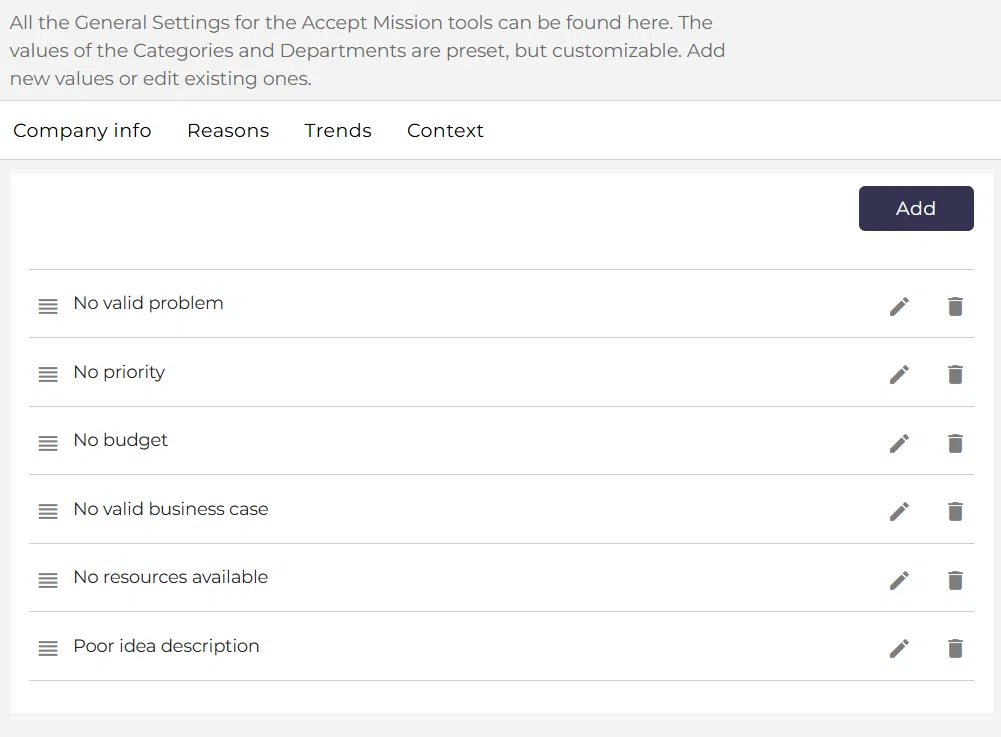
Navigation path: Innovation Studio → Settings → Data and structures → Status reasons
How to use this feature #
Status reasons should be configured centrally so teams can use a shared set of explanations when ideas change status. After setup, users can select the relevant status reason in the idea detail view when updating or reviewing an idea.
This helps create a more consistent Decision trail across funnels and makes it easier to understand why ideas were approved, rejected, or paused.
Step by step instructions #
- Open Innovation Studio.
- Go to Settings.
- Select Data and structures.
- Open Status reasons.
- Add or update the status reasons your company wants to use.
- Save the changes.
- Open an idea in the Innovation Studio.
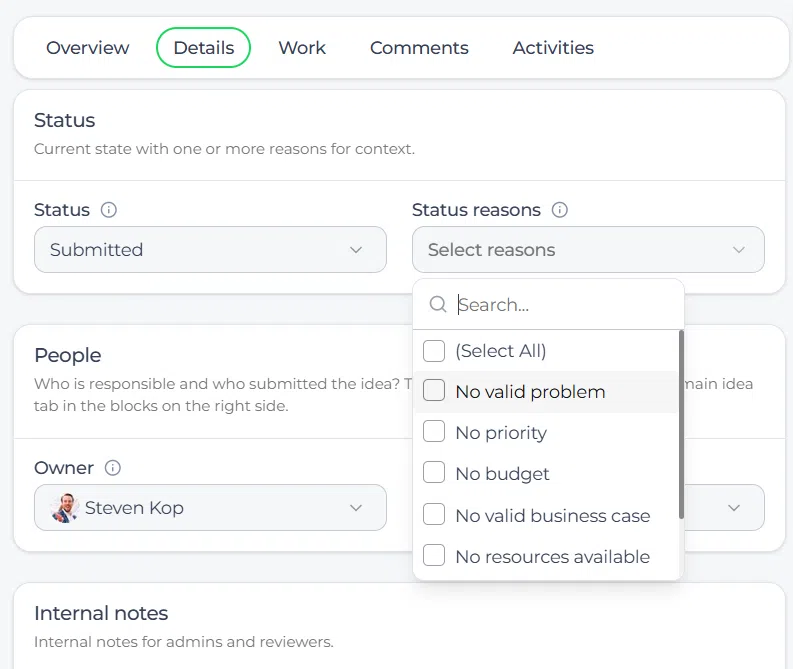
- Go to the Details tab.
- Find the Status reasons field.
- Select the relevant reason that explains the current status or Decision.
- Save the idea.
Why status reasons matter #
Contextual clarity #
Status reasons make Decision-making easier to understand. Instead of only seeing that an idea was rejected or approved, users can also see the reason behind that outcome.
Learning and continuous improvement #
Over time, status reasons create a useful knowledge base. Teams can review which reasons appear most often and learn from repeated patterns in Decision-making.
Data-driven decisions #
When status reasons are used consistently, they create structured data that can reveal trends such as market readiness issues, resource limitations, or strategic misalignment.
Alignment across teams #
Status reasons help different departments use the same language when discussing idea outcomes. This improves collaboration between innovation, business, finance, and subject matter teams.
Iterative refinement #
Status reasons should be reviewed and improved over time. As the organization matures, the list can be updated so it remains relevant to the current innovation process.
Recognition and motivation #
Status reasons can also support positive reinforcement. When an idea is approved, a clear positive reason can highlight strategic fit, value, or strong execution potential.
Configuration and adjustments #
Status reasons are managed in Innovation Studio → Settings → Data and structures → Status reasons. Because they are configured at company level, the same structure can be used consistently across ideas.
Keep the list practical and understandable. Use reasons that help explain real Decision patterns, such as strategic fit, feasibility, market readiness, or resource availability. Too many overlapping reasons can reduce clarity instead of improving it.
Review the list regularly and update outdated reasons when your process or governance model changes. This keeps the feature useful for both Decision-making and learning.
Practical example – Innovationlands #
Innovationlands uses status reasons to improve transparency in its attraction and guest experience funnels. When the innovation board reviews new concepts, they want contributors to understand not only the final status but also the reason behind it.
The Admin configures status reasons such as Strategic fit, Not feasible in current season, Budget not available, Requires further validation, and Strong guest impact. These reasons are then available in idea records.
When a new queue entertainment concept is placed on hold, the team selects Requires further validation. When a mobile pre-order concept is approved, they select Strong guest impact. This gives Innovationlands a clearer Decision history and helps teams learn from past evaluation outcomes.



 English
 Dutch
Dutch Portuguese
 Spanish
 French
 German
 Arabic