
 Doc Summary
A submit notification is a message shown to a user after they submit an idea. This can be displayed on screen, sent by email, or both. In Accept Mission, you can configure this notification for both campaigns and the Company IdeaBox.
Why this feature is needed #
A submit notification helps you confirm that an idea was received and gives contributors immediate guidance after submission. It is useful when you want to thank users, explain what happens next, invite another submission, or encourage users to share the campaign with colleagues.
This feature is especially helpful when you want to set expectations early in the idea collection process. For example, you can explain whether an idea will be reviewed directly, whether the contributor should collect likes first, or whether follow-up communication will happen by email.
What this feature is #
The submit notification is part of the idea collection flow in Accept Mission. It appears after a user submits an idea through a campaign or through the Company IdeaBox. The notification can be used as a confirmation message and as a communication step in your intake process.
This feature belongs to the idea collecting side of Accept Mission. It supports participation in the Innovation Portal, while the configuration itself is managed in the Innovation Studio.
Access level #
You need permission to manage campaigns or the Company IdeaBox in the Innovation Studio.
Navigation path #
Navigation path: Innovation Studio → Missions → Idea Box → Notification
Navigation path: Innovation Studio → Missions → Campaigns → Open campaign → Notification
How to use this feature #
The submit notification is configured per collection tool. This means you can define one message for the Company IdeaBox and a different message for each campaign. The message can be written to match the purpose of the collection flow and the type of contributor action you want after submission.
Before configuring the message, decide whether the notification should only confirm submission or also guide the contributor to a next step. Keep the message short, clear, and directly related to the submission context.
Step by step instructions #
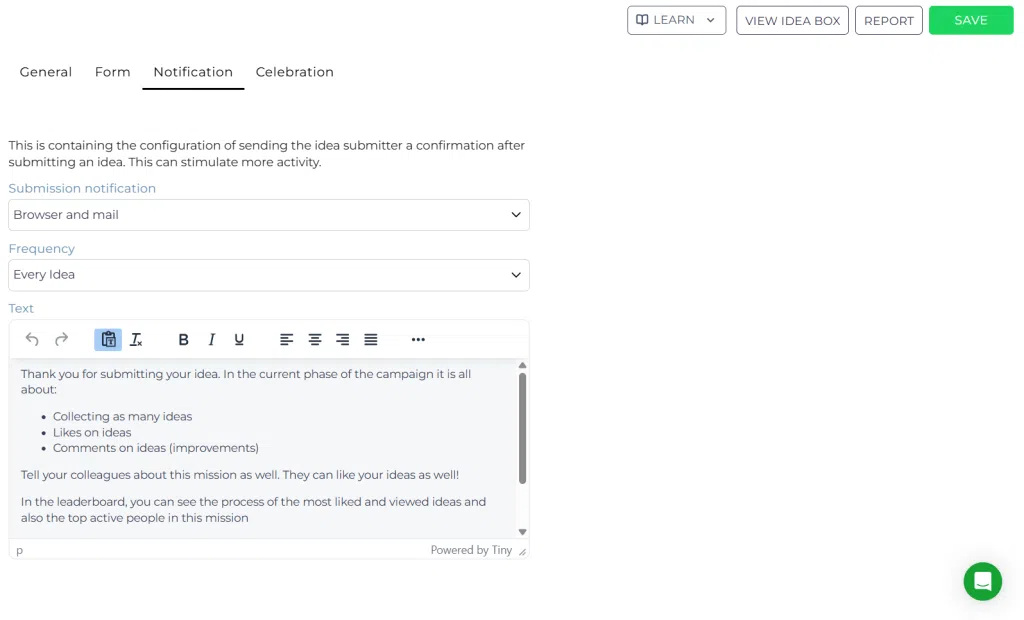
Configure a submit notification for the Company IdeaBox #
- Open Innovation Studio.
- Go to Idea collecting.
- Open IdeaBox.
- Select the Notification tab.
- Enter the message you want users to receive after submitting an idea.
- Choose whether the notification should be shown on screen, sent by email, or both, depending on the available setup.
- Save your changes.
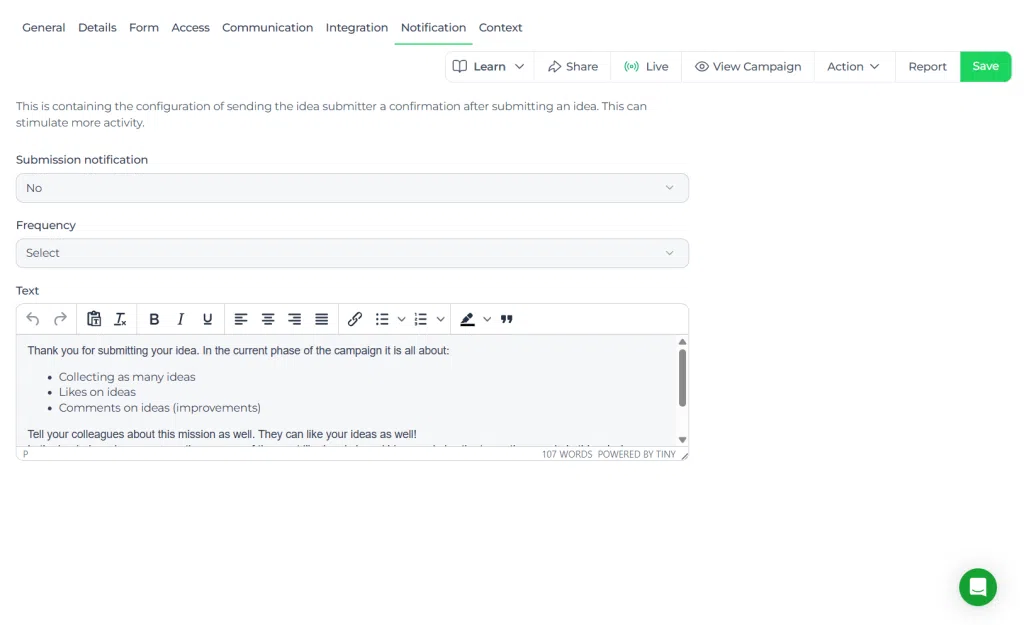
Configure a submit notification for a campaign #
- Open Innovation Studio.
- Go to Idea collecting.
- Open Campaigns.
- Select the campaign you want to configure.
- Open the Notification tab.
- Enter the message users should receive after they submit an idea to this campaign.
- Choose whether the notification should be shown on screen, sent by email, or both, depending on the available setup.
- Save the campaign.
Configuration and adjustments #
You can adjust the submit notification separately for each campaign and for the Company IdeaBox. This allows you to tailor the message to the collection context.
- Use the Company IdeaBox notification for continuous idea intake across the organization.
- Use campaign notifications for time-bound or theme-based submissions.
- Update the wording whenever the review process, campaign goal, or expected contributor action changes.
When editing the message, make sure it reflects the actual next step in your workflow. If users need to wait for review, say so clearly. If they should invite colleagues to vote or comment, include that instruction directly in the notification.
Practical example #
Innovationlands example #
Innovationlands runs a campaign to collect ideas for improving guest flow during peak summer weeks. The innovation team uses a campaign-specific submit notification to thank contributors and explain that ideas will first be checked for relevance before moving into the funnel for evaluation.
The message also asks contributors to share the campaign with frontline park staff, because operations ideas are often strongest when multiple teams contribute. After intake, relevant ideas move into a structured funnel where the team reviews idea quality, checks alignment with the strategic domain of operational excellence and scalability, and prepares shortlisted ideas for Decision-making.
For the always-open Company IdeaBox, Innovationlands uses a different notification. That message thanks employees for spontaneous submissions and explains that new ideas are reviewed periodically before they are enriched, scored, and potentially moved forward into a more formal initiative process.
Related guidance #
If you use both campaigns and the Company IdeaBox, keep the tone and process explanation consistent, but tailor the call to action to the specific collection method.



 English
 Dutch
Dutch Portuguese
 Spanish
 French
 German
 Arabic