
 Doc Summary
Why this feature is needed #
Not all valuable ideas emerge during structured campaigns. Employees often get inspiration while working, observing customers, or solving daily problems. Without a simple and always available way to capture these ideas, organizations lose potential innovation.
The Company IdeaBox solves this by providing a continuous idea submission channel. It allows users to submit ideas instantly from the Innovation Portal without needing to wait for a campaign.
What this feature is #
The Company IdeaBox is an always-on idea collection channel within Accept Mission. It enables users to submit ideas directly from the Innovation Portal, while ensuring all ideas are routed into a structured idea funnel for evaluation and Decision-making.
This feature connects the Innovation Portal, where ideas are submitted, with the Innovation Studio, where ideas are structured, enriched, and evaluated. :contentReference[oaicite:0]{index=0}
Admins and power users configure the IdeaBox in the Innovation Studio. They define:
- Which funnel receives new ideas
- What fields users must complete
- How notifications are handled
- How AI features support idea creation and routing
Access level #
Configuration requires access to Innovation Studio and permissions to manage idea collecting settings.
Navigation path #
Navigation path: Innovation Studio → Idea Collecting → IdeaBox
How to use this feature #
The Company IdeaBox works as a bridge between user participation and structured innovation management. Users submit ideas from the portal, and these ideas are automatically routed into a predefined funnel.
Admins configure how this intake works, including form structure, required fields, and notifications.
Step by step instructions #
Step 1: Enable the Company IdeaBox #
- Go to Innovation Studio
- Navigate to Idea Collecting
- Open IdeaBox settings
- Set “Enable Company Idea Box” to Yes
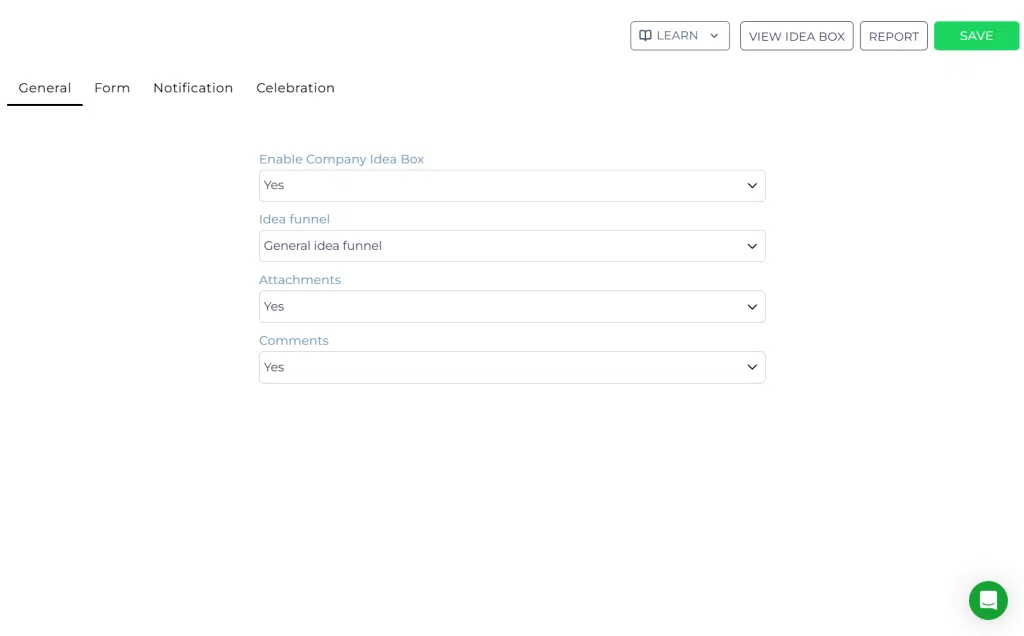
Step 2: Select the idea funnel #
- In the General tab, select the funnel where ideas should be stored
- Choose the appropriate idea funnel (for example “General idea funnel”)
This funnel determines how ideas will be processed, evaluated, and advanced.
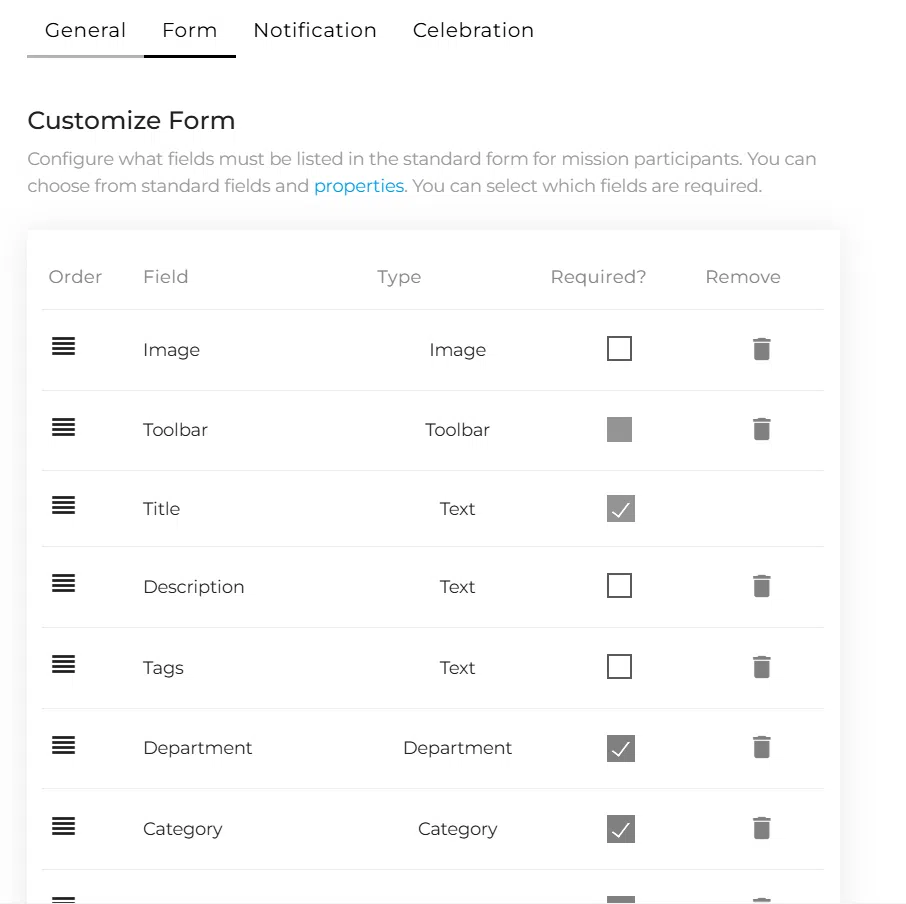
Step 3: Configure form fields #
- Go to the Form tab
- Add or remove fields from the submission form
- Define which fields are required
- Reorder fields if needed
- Connect custom properties if applicable
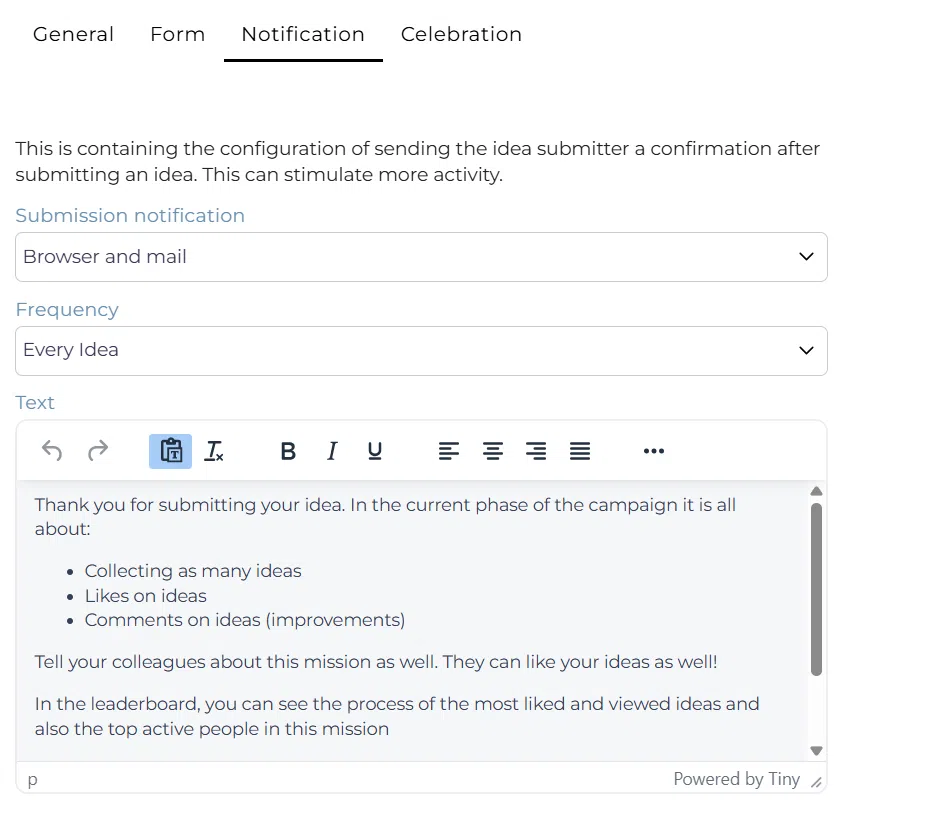
Step 4: Configure notifications #
- Go to the Notification tab
- Select how users receive confirmation (browser, email, or both)
- Define notification frequency
- Customize the confirmation message text
Step 5: Configure additional options #
- Enable attachments if users should upload files
- Enable comments if collaboration is allowed
These options influence how users interact with ideas after submission.
Step 6: Use the IdeaBox from the portal #
- Go to the Innovation Portal
- Click “Submit idea”
- Fill in the configured form
- Submit the idea

Configuration and adjustments #
Idea routing via funnels #
The selected funnel determines how ideas are processed. You can configure advanced routing inside the funnel settings.
AI idea routing #
You can enable AI-based routing by:
- Creating a simple intake funnel
- Opening funnel settings
- Configuring the Idea Router
- Defining routing rules to distribute ideas to other funnels
This allows automatic classification and distribution of ideas based on content.
AI idea generation #
If AI is enabled, users can generate ideas based on prompts. The system uses company context to provide relevant suggestions.
AI coach #
The AI coach supports users while submitting ideas by:
- Improving titles
- Enhancing descriptions
- Suggesting departments, categories, and strategic alignment
This improves idea quality before submission.
Notifications via funnel settings #
Additional notifications for idea owners, reviewers, and funnel managers can be configured in the funnel settings.
Reporting #
Use reports to track IdeaBox performance over time, including submission volume and engagement.
Practical example – Innovationlands #
Innovationlands uses the Company IdeaBox to capture spontaneous ideas from employees across its theme parks. :contentReference[oaicite:1]{index=1}
An employee in park operations notices long waiting times at a popular ride and submits an idea directly through the portal.
The idea is automatically routed into the “General idea funnel,” where:
- The AI coach improves the clarity of the submission
- The idea is assigned to the Operations department
- The idea enters the intake stage for review
If AI routing is enabled, the system may automatically redirect the idea to a more specific funnel such as “Capacity and flow management.”
The innovation team reviews the idea, scores it based on impact and feasibility, and decides whether to move it forward into validation or convert it into an initiative.
This setup ensures that even unstructured, spontaneous ideas are captured, structured, and evaluated consistently within the broader innovation workflow.



 English
 Dutch
Dutch Portuguese
 Spanish
 French
 German
 Arabic