
 Doc Summary
Why this feature is needed #
Not every project should be visible to all users. Some projects involve sensitive innovation initiatives, early-stage experiments, strategic investments, or restricted collaboration groups that require controlled access.
Keeping projects private helps organizations protect confidential work while still allowing the right people to review, manage, and execute those projects in a structured way.
What this feature is #
Accept Mission allows you to keep projects confidential by controlling access at the project funnel level. This makes it possible to restrict who can view or manage projects within a specific project funnel.
Privacy is managed through the Access settings of the project funnel. From there, you can limit visibility for both users and admins. When access is set to private, only the users, groups, or admins you explicitly allow can access the funnel and its projects.
Access level #
You need permission to edit project funnel settings before you can make projects private.
Navigation path #
Navigation path: Innovation Studio → Settings → Funnel configuration → Open project funnel → Edit funnel → Access
How to use this feature #
Project confidentiality is managed through the project funnel. By setting access to private, you make sure the projects in that funnel are only visible to a limited audience.
When access is private, you must explicitly grant access to the users, groups, or admins who should still be able to work with those projects.
Step by step instructions #
- Open Innovation Studio.
- Go to Settings.
- Select Funnel configuration.
- Open the Project funnel you want to protect.
- Click Edit funnel.
- Open the Access tab.
- Set User access to Private if you do not want projects visible in the Innovation Portal.
- Set Admin access to Private if you want to restrict visibility in the Innovation Studio to selected admins only.
- Add the specific users, groups, or departments that should still have access.
- Save the changes.
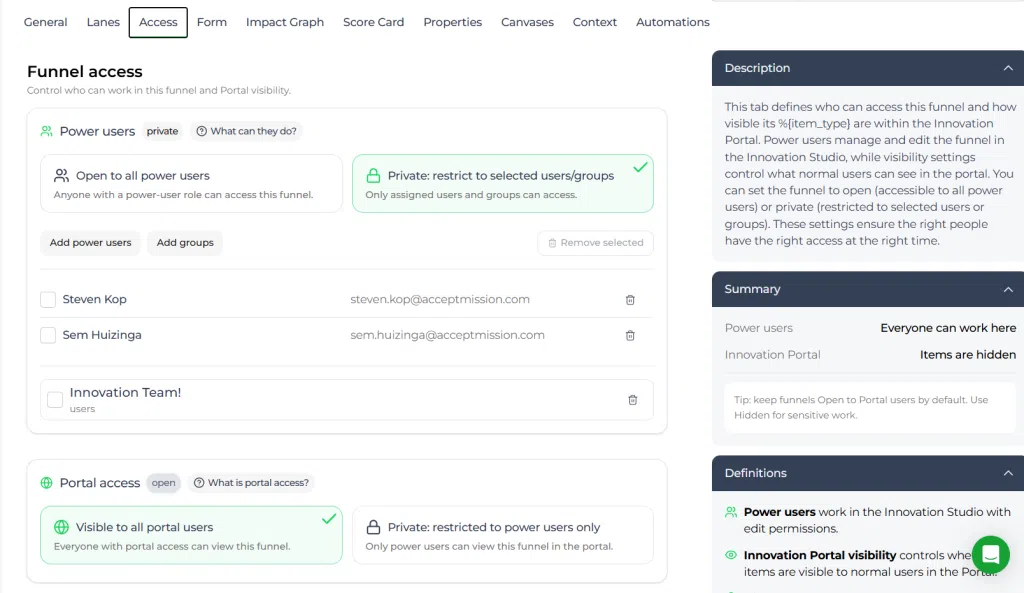
Project funnel settings #
Privacy for projects is managed through the project funnel because all projects in that funnel follow the same access rules. This means that once the funnel is private, its projects are also protected by that funnel-level access setup.
This setup is useful when a group of projects should only be visible to a specific team, department, or leadership group.
User access and Admin access #
User access #
Set User access to Private when you do not want the project funnel and its projects visible in the Innovation Portal unless users have been granted access explicitly.
Admin access #
Set Admin access to Private when you want to limit project visibility in the Innovation Studio to a selected group of admins only.
What happens after access is set to private #
After access is changed to private, the project funnel and its projects are no longer broadly visible. Only the users, groups, or admins you added to the access settings can still view and work with those projects.
This gives you a controlled environment for sensitive or strategic innovation work.
Configuration and adjustments #
Project confidentiality depends on the access configuration of the project funnel. If the funnel is private, only the allowed audience can work with the projects inside that funnel.
Use private project funnel settings when managing confidential projects, restricted experiments, or strategic initiatives that are not ready for wider visibility. Review the access list carefully whenever you update the funnel settings.
If both Admin access and user access are private, access must be assigned explicitly to the correct users, groups, or departments.
Practical example – Innovationlands #
Innovationlands is running a confidential project funnel for future attraction concepts that are still in an early strategic phase. These projects involve sensitive commercial assumptions and should not be visible across the wider organization.
The Admin opens the relevant project funnel, goes to the Access tab, and sets both User access and Admin access to Private. Access is then granted only to the innovation manager, the R&D lead, and a small executive review group.
This allows Innovationlands to manage confidential projects in a controlled environment while keeping the project workflow structured inside Accept Mission.



 English
 Dutch
Dutch Portuguese
 Spanish
 French
 German
 Arabic