
 Doc Summary
Why this feature is needed #
Innovation teams often need help turning rough input into clearer ideas, stronger Problem definitions, better campaign plans, or more relevant Trend insights. The AI tools in Accept Mission support these tasks directly inside the platform.
This feature is useful when you want to improve the quality of innovation work without starting from scratch each time. Instead of manually structuring every idea, Problem, or campaign, users can use AI assistants to guide the process and produce clearer outputs for review and Decision-making.
What this feature is #
The AI tools section is a collection of AI assistants available in Accept Mission. These tools help users with idea development, Problem clarification, campaign planning, Trend research, and innovation maturity reflection.
The feature is part of the Innovation Studio and supports the broader innovation workflow by helping users enrich information before it moves into evaluation, prioritization, or execution.
Available AI tools #
Idea Enricher
This AI assistant helps improve an idea through guided questions. It helps reveal the idea background, the Problem, and the most important elements needed for a stronger pitch.
Problem Discovery
This AI assistant helps users define a Problem statement based on a topic, situation, or early idea. It asks follow-up questions and turns the input into a concise Problem description.
Campaign Builder
This AI assistant helps create a campaign plan. It asks questions about the subject, target group, and planning, then produces a structured campaign outline.
Trend Researcher
This AI assistant helps identify trends relevant to a company, industry, or sector. It supports exploration of sector trends, technology trends, and company-relevant developments.
Maturity Quick Scan
This tool evaluates innovation capability across five areas: Process, Goals, People, Management, and Tools. It helps identify strengths, gaps, and improvement opportunities.
Access level #
Prerequisite: the user must have access to the Innovation Studio and the AI tools section.
Navigation path #
Navigation path: Innovation Studio → AI-tools
How to use this feature #
The AI tools section is designed to support structured innovation work. Each assistant focuses on a specific task and uses guided interaction to collect context before generating an output. In most cases, the user starts with a topic, idea, or business question and then answers follow-up questions from the AI assistant.
The quality of the result depends on the quality of the input. Clear context, specific answers, and complete information usually lead to more useful outputs.
Step by step instructions #
- Open the Innovation Studio.
- Go to the AI-tools section.
- Select the AI tool that matches your task, for example Idea Enricher or Campaign Builder.
- Enter your starting input, such as an idea description, a topic, a business challenge, or a company name.
- Answer the follow-up questions shown by the assistant.
- Review the generated result, such as a pitch, Problem statement, campaign plan, Trend overview, or maturity summary.
- Use the output to improve idea quality, prepare a campaign, support evaluation, or guide follow-up actions in your innovation workflow.
Practical example #
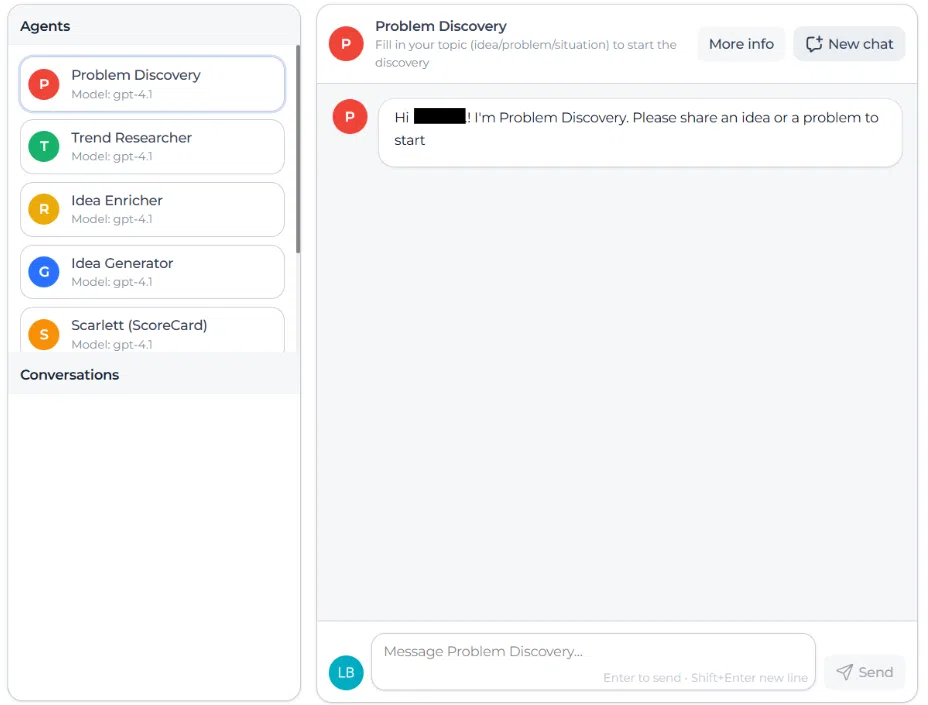
Innovationlands wants to improve guest flow during peak days in Innovationlands World. A Power User opens Problem Discovery in the AI-tools section and starts with the topic: long waiting times around major attractions during school holidays. The assistant asks follow-up questions about when the issue occurs, which visitors are affected, and what operational constraints exist.
After answering the questions, the tool generates a clear Problem statement that the Innovationlands team can use in its structured funnel. The team then uses this output as the basis for a new idea intake and compares possible solutions against strategic goals such as guest value and experience excellence and operational excellence and scalability.
In another case, the same team uses Idea Enricher to strengthen an early idea for a virtual queue improvement. The enriched output gives Decision-makers better context before scoring the idea and deciding whether it should move forward into validation or transition into a project.



 English
 Dutch
Dutch Portuguese
 Spanish
 French
 German
 Arabic