
 Doc Summary
Why this feature is needed #
Teams often start with an idea, observation, or situation, but the underlying Problem is not yet clearly defined. Without a clear Problem statement, it is harder to evaluate relevance, compare ideas, and decide what should move forward.
The Problem discovery assistant helps users turn loose input into a structured Problem definition. This creates a better starting point for idea development, evaluation, and project decisions.
What this feature is #
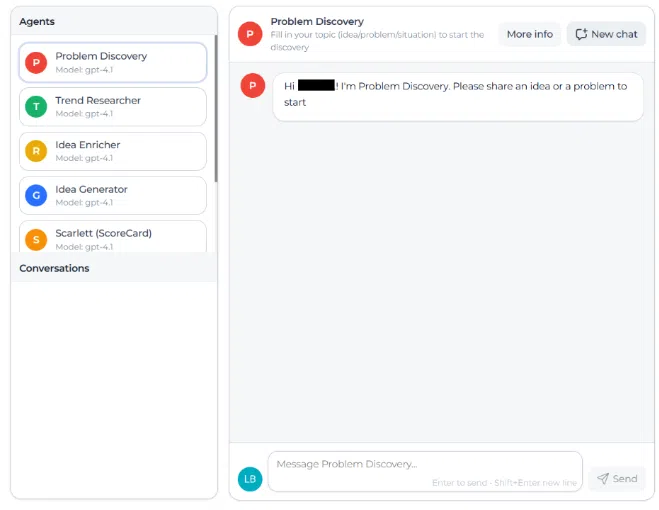
The Problem discovery assistant is an AI supported feature in Accept Mission that helps users explore and define a Problem based on a topic they enter. The topic can be an idea, a challenge, or a situation that needs further clarification.
The assistant asks follow-up questions to gather more context and identify the reasons behind the issue. When enough information has been collected, it generates a Problem statement that can be used to support further innovation work.
This feature supports early-stage idea development by improving Problem clarity before teams continue with scoring, validation, or project transition.
Access level #
You need access to the AI assistant area in the Innovation Studio before you can use this feature.
Navigation path #
Navigation path: Innovation Studio → Labs → Problem discovery
How to use this feature #
The assistant works as a guided conversation. You start with a topic, and the assistant asks questions to better understand the context, symptoms, and possible causes. The quality of the result depends on how specific your input is.
Longer and more concrete answers usually produce a better Problem statement. Vague answers can lead to a generic outcome.
Step by step instructions #
- Open Innovation Studio.
- Go to Tools.
- Select AI tools.
- Open Problem discovery.
- Enter the topic you want to explore. This can be an idea, a Problem, or a situation.
- Answer the assistant’s follow-up questions in as much detail as possible.
- Continue the conversation until the assistant has enough context.
- Review the generated Problem statement.
- Save the result and use it to update the related idea or project if needed.
Tips for better results #
- Give detailed answers instead of short replies.
- Be specific about scale, impact, numbers, or percentages where possible.
- Look beyond the visible issue and describe the deeper reason behind the Problem.
- Use the final Problem statement as input for idea refinement, scoring, or next-step decisions.
Configuration and adjustments #
This feature is accessed from Innovation Studio → Labs → Problem discovery. The assistant behavior is based on the information the user provides during the conversation.
To improve output quality, encourage users to enter concrete context and complete answers. The generated Problem statement should still be reviewed by the user before it is used in an idea or project record.
Practical example – Innovationlands #
Innovationlands wants to improve the guest experience at one of its busiest parks. A team member starts with the topic: long waiting times at food outlets during peak afternoon hours.
The Problem discovery assistant asks follow-up questions about queue lengths, guest complaints, staffing levels, purchase patterns, and the impact on guest satisfaction. Based on these answers, the assistant creates a Problem statement describing that peak-time food service delays are reducing guest satisfaction and limiting revenue during high traffic periods.
The Innovationlands team saves this result and adds it to the related idea in the funnel. This gives reviewers a clearer basis for scoring impact, urgency, and feasibility before deciding whether the idea should move into validation or become part of a project.



 English
 Dutch
Dutch Portuguese
 Spanish
 French
 German
 Arabic