
 Doc Summary
Why this feature is needed #
Not everyone who contributes to an idea needs full Admin access. In many cases, a standard user should only be involved in one specific idea to help enrich it, provide feedback, or collaborate on next steps.
Adding a Normal User to the team of an idea makes collaboration possible without changing that person’s overall platform role. This helps keep access focused while still involving the right people in the work.
What this feature is #
Accept Mission allows admins to give a Normal User access to a specific idea by adding that person to the idea team. Once added, the user can access that idea and collaborate with the existing team.
This is useful when you want to involve a subject matter expert, project contributor, stakeholder, or reviewer in one idea without giving broader administrative permissions. The same approach can also be used for projects.
Access level #
You need Admin permissions to add team members to an idea and grant collaboration access at this level.
Navigation path #
Navigation path: Innovation Studio → Ideas → Open idea → Team
How to use this feature #
Collaboration access is managed inside the idea itself. By adding a user to the team, you give that person access to work on the idea together with the existing team members.
After the user is added, they receive a notification so they can open the idea and start collaborating.
Step by step instructions #
- Open Innovation Studio.
- Go to Ideas.
- Open the idea you want to share.
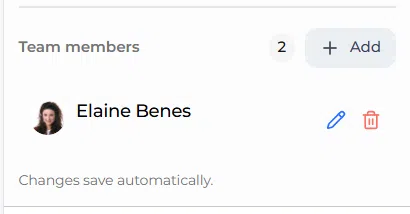
- On the right side of the idea view, find the Team block.
- Click the Team member button.
- Select the Normal User you want to add.
- Save the change.
- Confirm that the user now appears in the team list.
What happens after access is granted #
Once the user is added to the idea team, they gain access to that specific idea for collaboration. This allows them to work with the team without being given a broader Admin role.
The user automatically receives a notification with access to the idea so they can open it and participate.
Configuration and adjustments #
This type of access is managed at the idea level, not by changing the user’s platform role. That means a standard user can collaborate on a specific idea while still remaining a Normal User in the wider system.
Use this approach when you want focused collaboration on one idea or project. It is a practical way to involve experts, stakeholders, or supporting team members without expanding platform-wide permissions.
Practical example – Innovationlands #
Innovationlands is working on an idea to improve queue entertainment in one of its busiest parks. The innovation manager wants input from a guest experience specialist who is a Normal User in the platform.
Instead of changing that person’s role to Admin, the innovation manager opens the idea, goes to the Team block, and adds the specialist as a team member. The specialist then receives a notification and can open the idea to add feedback and collaborate with the rest of the team.
This allows Innovationlands to involve the right expertise at idea level while keeping overall platform access controlled.



 English
 Dutch
Dutch Portuguese
 Spanish
 French
 German
 Arabic