
 Doc Summary
Why this feature is needed #
Not every innovation effort has the same purpose, Risk level, or time horizon. Some initiatives improve existing operations, while others explore new growth areas or future opportunities.
Innovation types help organizations classify ideas and projects in a consistent way. This makes it easier to balance the portfolio, communicate priorities, and report on innovation activity across the business.
What this feature is #
Innovation types are a company-level classification feature in Accept Mission used to structure innovation efforts across ideas and projects. They help teams label work according to a chosen innovation framework so that the portfolio can be managed and analyzed more clearly.
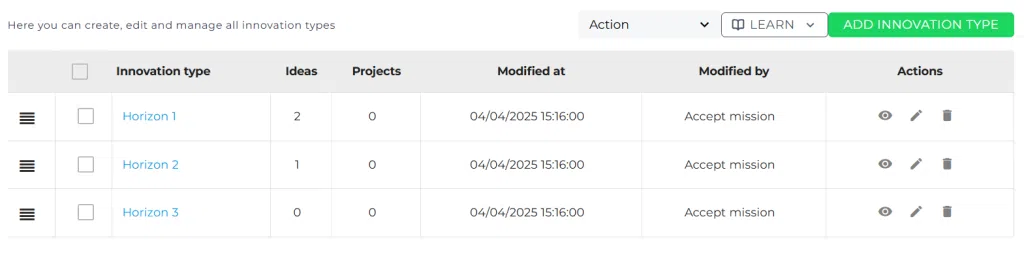
By default, Accept Mission includes the Three Horizons Model with Horizon 1, Horizon 2, and Horizon 3. Organizations can edit these labels, descriptions, and ordering to match their own strategy. They can also configure a completely different structure if another framework is more relevant.
Once configured, innovation types can be assigned to ideas and projects and used in dashboards, Power BI, and API-based reporting.
Access level #
You need permission to manage company-level settings before you can change innovation types.
Navigation path #
Navigation path: Innovation Studio → Settings → Data and structures → Innovation types
How to use this feature #
Innovation types are usually configured once at company level and then applied across ideas and projects. This allows teams to use the same classification logic in daily work, portfolio reviews, and reporting.
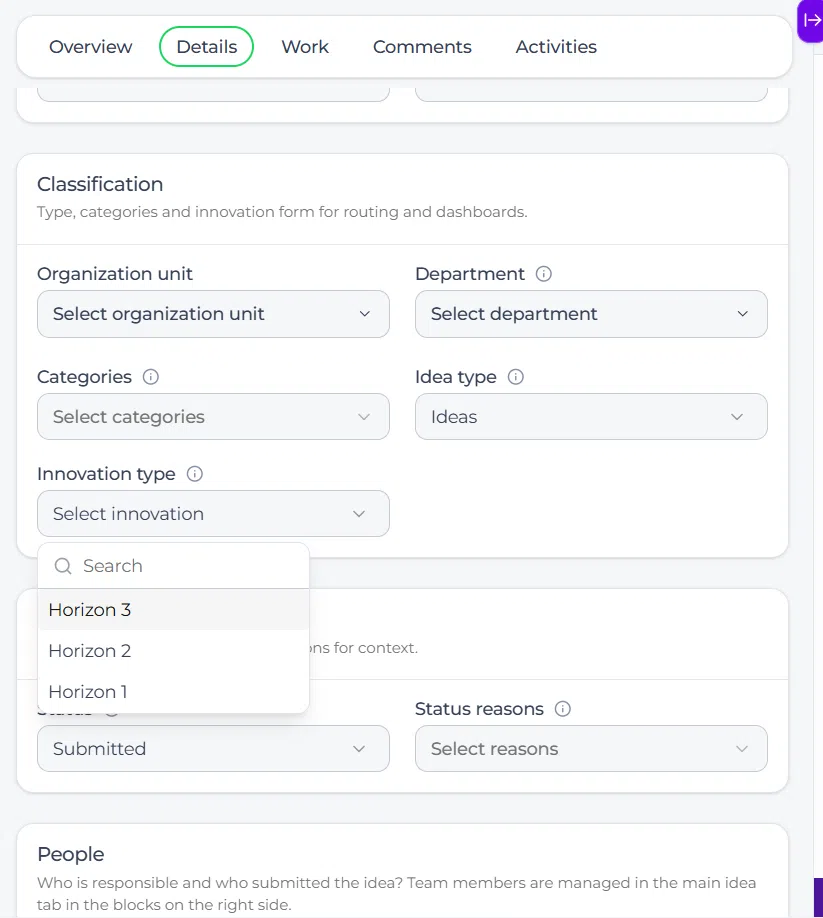
You can use the default Three Horizons Model or adjust the structure to match your own innovation framework. The chosen type can then be selected in the detail view of ideas and projects.
Step by step instructions #
- Open Innovation Studio.
- Go to Settings.
- Select Data and structures.
- Select Innovation types.
- Review the existing list of innovation types.
- Edit titles and descriptions if you want to match your own strategy or naming conventions.
- Reorder the types if needed to reflect your preferred sequence.
- Merge types when required by selecting the target type for reassignment.
- Save your changes.
- Open an idea or project detail page to assign the correct innovation type.
- Use dashboards or reporting tools to analyze results by innovation type.
Default model: Three horizons #
Accept Mission starts with the Three Horizons Model as the default setup.
Horizon 1 #
Focused on improving existing products, services, or processes. These initiatives are usually closer to current operations and often have lower uncertainty.
Horizon 2 #
Focused on adjacent growth, such as entering new markets, reaching new customer groups, or extending current capabilities into new areas.
Horizon 3 #
Focused on future opportunities and more disruptive innovation. These initiatives often involve more uncertainty and a longer time horizon.
Alternative frameworks #
Organizations are not limited to the Three Horizons Model. Innovation types can be configured to match a different strategic structure if that is more useful.
One example is the Ten Types of Innovation framework, which groups innovation across configuration, offering, and experience. If you want to use another structure for classification, you can adapt the innovation types list to match that model.
If your organization wants to use more than one framework at the same time, consider using innovation types for one structure and a Property for the other.
Assign innovation types to ideas and projects #
After configuration, innovation types can be assigned directly in idea and project records.
For ideas #
Open an idea in the Innovation Studio and go to the detail tab. Select the appropriate innovation type in the available field.
For projects #
Open a project in the Innovation Studio and go to the detail tab. Assign the innovation type in the same way.
Reporting with innovation types #
Innovation types are available in reporting so you can compare activity and outcomes across different categories.
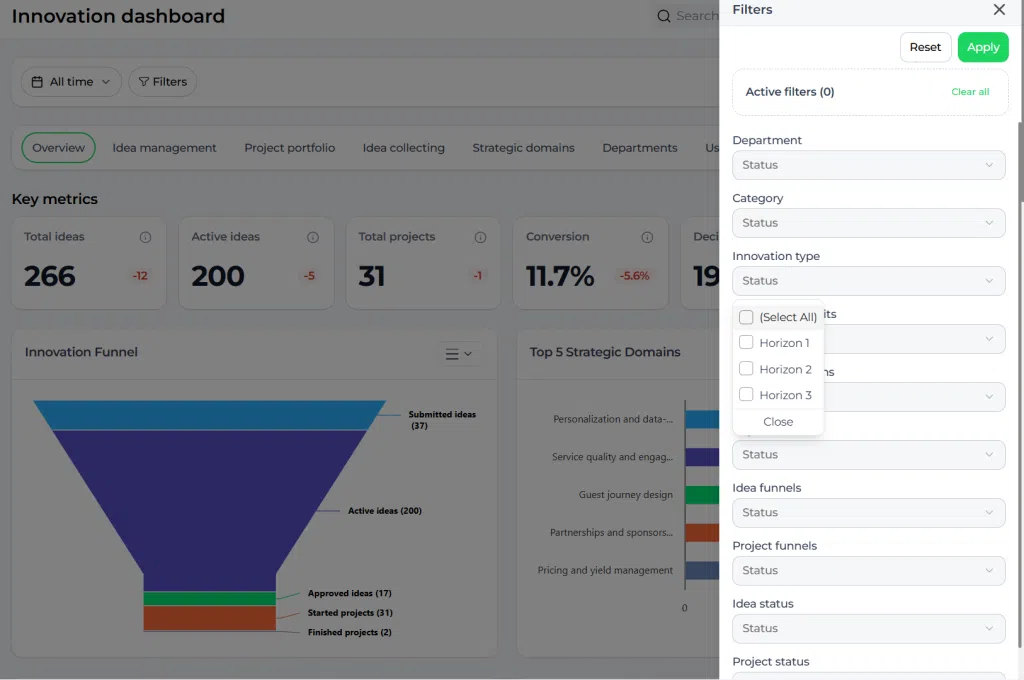
In the Innovation Dashboard, you can use innovation type filters to review KPIs such as idea volume, conversion, and project progress by category. Innovation types are also available through the Power BI connector and the public API for more advanced analysis.
Configuration and adjustments #
Innovation types are managed at company level in Innovation Studio → Settings → Data and structures → Innovation types. Changes made here affect the list available for ideas, projects, and reporting.
When adjusting the structure, keep the framework simple and useful for Decision-making. A small number of clear categories is usually easier to apply consistently than a long list with overlapping meanings.
If you merge two innovation types, connected ideas and projects are transferred to the selected target type. Review these changes carefully because they affect historical classification and reporting.
Practical example – Innovationlands #
Innovationlands uses innovation types to classify ideas and projects across its parks. The central innovation team starts with the default Three Horizons Model because it helps distinguish between short-term operational improvements and longer-term experience innovation.
An idea to improve ride maintenance planning is marked as Horizon 1 because it improves an existing operational process. A concept for entering a new family entertainment segment is marked as Horizon 2. A future mixed-reality attraction concept is classified as Horizon 3.
During portfolio reviews, Innovationlands uses dashboard filters to compare how many ideas and projects exist in each horizon. This helps leadership see whether the portfolio is too focused on short-term improvements or whether there is enough investment in longer-term growth opportunities.



 English
 Dutch
Dutch Portuguese
 Spanish
 French
 German
 Arabic