
 Doc Summary
Why this feature is needed #
The Innovation Studio is the main working environment for admins and other power users who manage innovation processes in Accept Mission. It gives access to the tools needed to review ideas, manage missions, configure settings, and monitor innovation activity.
This feature is needed because contributors and admins work in different parts of the platform. Contributors usually work in the Innovation Portal, while admins need a dedicated environment for governance, configuration, and Decision-making.
What this feature is #
The Innovation Studio is the control and execution environment within Accept Mission. It is designed for users who manage innovation workflows, oversee submissions, configure platform behavior, and support structured Decision-making.
From the Innovation Studio, admins can access tools such as dashboards, idea and Mission management, selections, projects, canvases, funnels, people management, settings, and support resources.
The Innovation Studio connects to other parts of the platform. Ideas may be submitted through the Innovation Portal, but they are typically reviewed, enriched, and governed in the Innovation Studio.
Access level #
You must have an Admin role to open and use the Innovation Studio. If you do not see the available navigation options described in this article, your account may not have the required permissions. Contact your internal Accept Mission administrator.
Navigation path #
Navigation path: Innovation Portal → Header → Innovation Studio
Alternative navigation path: User menu → Innovation Studio
How to use this feature #
When an Admin signs in, the system can open directly in the Innovation Studio depending on the user role and platform setup. This environment is intended for management and governance tasks, not for general participation.
There are multiple ways to open the Innovation Studio. The exact option you see may depend on where you are in the platform and which permissions are assigned to your account.
Step by step instructions #
- Sign in to Accept Mission with an account that has an Admin role.
- Open the Innovation Studio using one of the available methods:
- Use the direct Innovation Studio link provided by your organization.
- Open the Innovation Portal and select Innovation Studio from the header.
- Open the user menu in the top right corner and select Innovation Studio.
- After opening the Innovation Studio, review the left sidebar to access the available tools.
- Use the landing page to understand where different Admin functions are located.
- Open the relevant area, such as Ideas, Missions, Projects, Funnels, People, or Settings, depending on the task you want to perform.
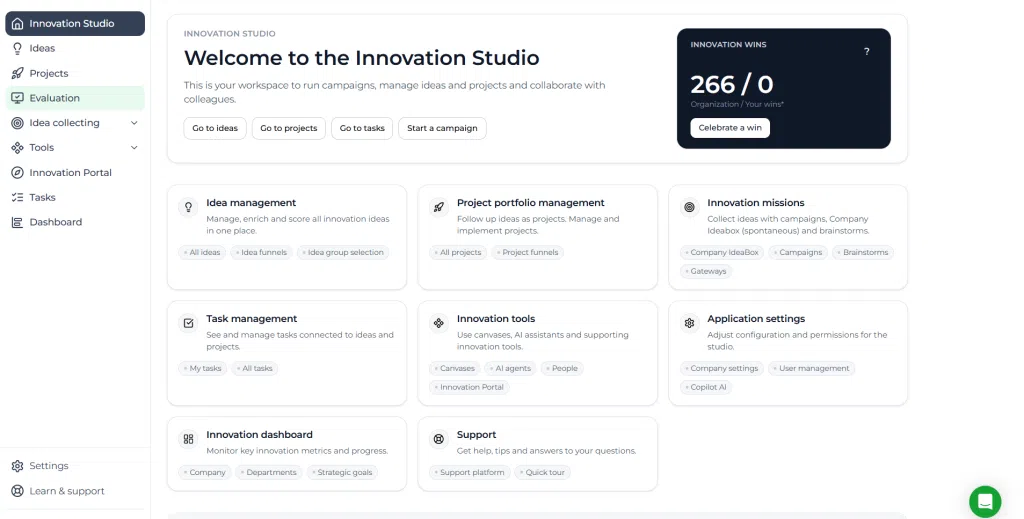
Screenshot: Innovation Studio landing page.
Description: Show the Innovation Studio home screen with the left sidebar and the main Admin workspace visible.
Configuration and adjustments #
The Innovation Studio itself is not a separate configuration feature, but many platform settings are managed from this environment. Admins can open the Settings area in the sidebar or through the user menu to adjust company-level and process-level configuration.
Typical configuration areas available from the Innovation Studio include:
- Company settings
- User and group management
- Branding
- Security
- Custom domain
- Funnel management for ideas and projects
- Company score management
- Properties
- Tag management
- Subscription management
Changes made in these areas can affect how users access the platform, how innovation workflows are structured, and how ideas and projects are governed across the organization.
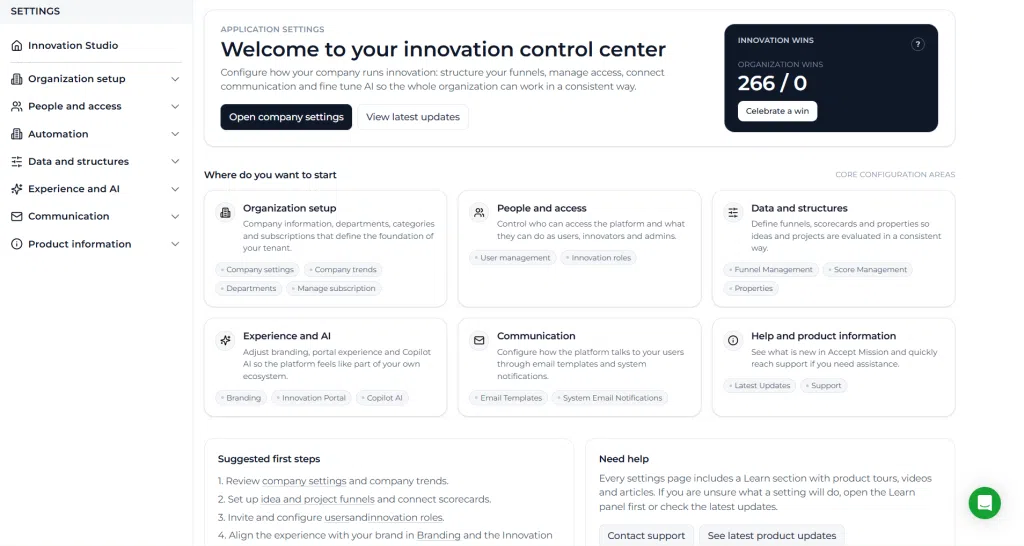
Screenshot: Innovation Studio settings access points.
Description: Show the Settings option in the Innovation Studio sidebar and in the user menu dropdown.
Practical example – Innovationlands #
At Innovationlands, the Park Innovation Lead for Innovationlands World signs in with an Admin account and lands in the Innovation Studio. From there, the lead opens the Ideas area to review submissions related to guest experience improvements and then checks Missions to monitor active participation campaigns.
Later, the same Admin opens Settings to update the project funnel used for attraction improvement initiatives. This helps ensure that promising ideas move through a structured review flow, are evaluated consistently, and can be prepared for Decision-making before being converted into projects when approved.
For example, an idea about reducing waiting time at a popular attraction may first be reviewed in the Innovation Studio, aligned to the correct department and strategic focus area, scored by the responsible team, and then advanced into a project after a formal Decision moment.



 English
 Dutch
Dutch Portuguese
 Spanish
 French
 German
 Arabic