
 Doc Summary
Why this feature is needed #
When a funnel contains many ideas, teams need a quick way to see which ideas are more aligned with relevant trends. This helps reviewers understand which ideas fit current company focus areas and which ideas may be more relevant because of broader industry or global developments.
The Trend score helps power users and admins prioritize ideas based on Trend alignment. This makes it easier to identify which ideas may deserve earlier review or stronger attention in the funnel.
What this feature is #
Trend score is one of the power scores available in the idea funnel. It represents how trending an idea is based on company trends, industry trends, and global trends.
This score is based on three levels of trends. The first level is Company trends, which are managed in the settings area of the platform. The second level is Industry trends. The third level is Global trends.
The score helps teams understand whether an idea is aligned with the direction of the company and with broader developments outside the organization. This gives extra context during enrichment, scoring, and selection.
Access level #
You need access to the relevant funnel in the Innovation Studio to work with Trend score. Admin access is required to manage company trends.
Navigation path #
Navigation path: Innovation Studio → Settings → Organization setup → Company settings → Trends
How to use this feature #
The Trend score is used to help identify which ideas are more aligned with relevant trends. This can support prioritization when there are many ideas in the funnel and the team wants to focus first on ideas that match important developments.
You can use the Trend score from the funnel filters, list view, and statistics block.
Step by step instructions #
- Open Innovation Studio.
- Go to Settings.
- Open Organization setup.
- Select Company settings.
- Open the Trends tab.
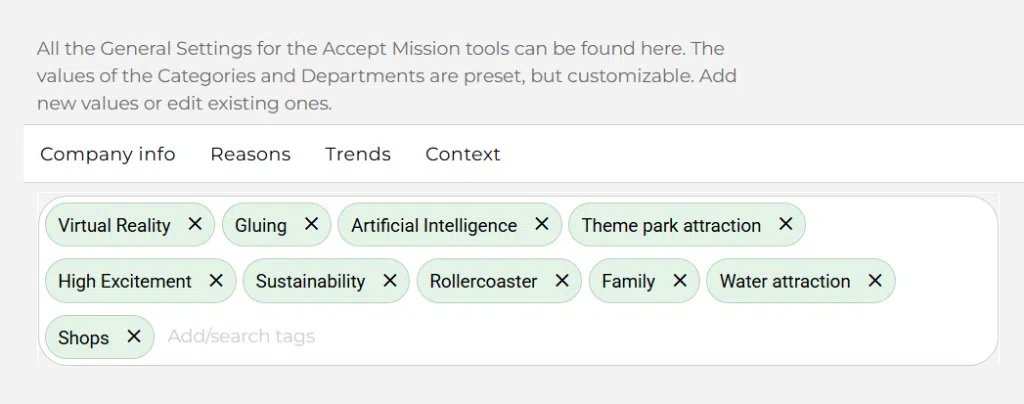
- Review the configured company trends.
- Use these trends as context when reviewing ideas in your funnel.
- Open a funnel, use the available score views, and review ideas based on their Trend score.
Power scores in the idea funnel #
To help admins and power users understand what work is still needed in the funnel and which ideas may be more interesting to follow up on, Accept Mission offers several power scores in the idea funnel.
- Engagement score – This score is based on views, likes, comments, and other activity in the funnel. The more engagement an idea gets, the higher the score.
- Enrichment score – This score represents how complete an idea is filled in. The more complete the idea, the higher the score. This helps identify what ideas still need enrichment.
- Idea score – This score represents the total score given in the score module for the idea. This helps identify which ideas still need scoring.
- Trend score – This score represents how trending an idea is based on company trends, industry trends, and global trends.
- Opportunity score – This score is based on an AI service that combines many variables, scores, and interactions to calculate how interesting an idea may be to evaluate first.
What is the Trend score? #
This score is based on the trending score. This is defined based on three levels of trends.
Company trends #
Based on the company trends you define, ideas that are in line with your company trends will get a higher score.
You can find these here:
Navigation path: Innovation Studio → Settings → Organization setup → Company settings → Trends
Industry trends #
Based on the trends defined in your industry, ideas will be scored higher.
Global trends #
Based on world global trends, ideas will be scored higher.
Where can you see these scores? #
Idea funnel power filters #
In the idea funnel, you can find smart filters for the most important scores. These filters help you use the scores as a practical to-do list and also help you identify ideas with stronger potential.
List view columns #
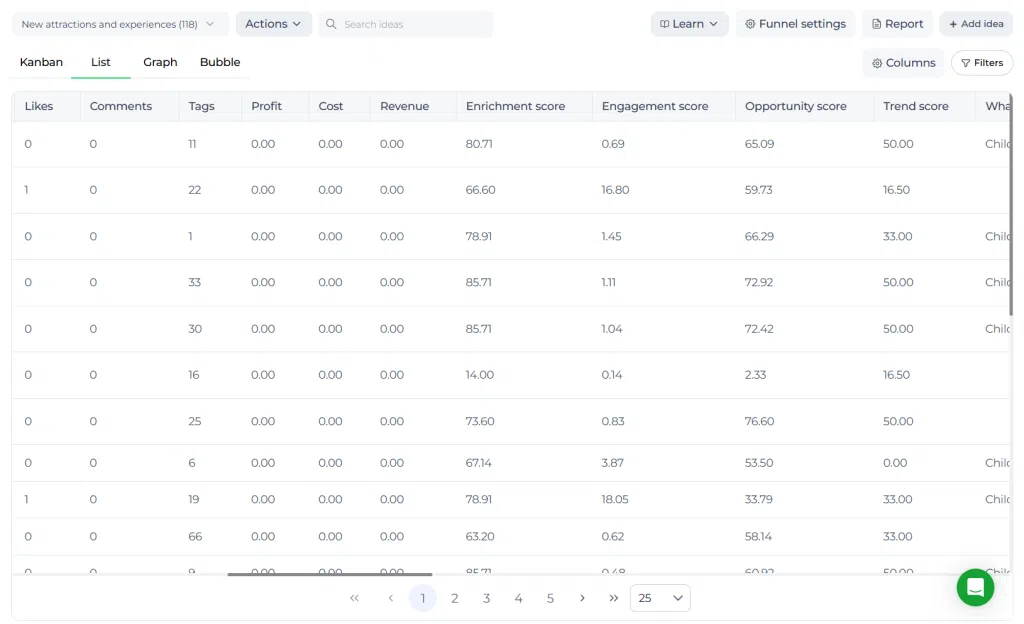
Open your funnel and select the List view. Here, you can see columns with the available scores and order the items based on these values.
Statistics block per idea #
All scores can also be seen per idea in the Statistics block. Open an idea and scroll down on the right side to view the Statistics section.
Practical example – Innovationlands #
Innovationlands uses Trend score in its New attractions funnel to identify ideas that are aligned with the group’s current focus areas. The company has configured trends such as Artificial Intelligence, Sustainability, Virtual Reality, Family, and Water attraction.
When the innovation team reviews new attraction concepts, ideas that connect well to those themes receive a stronger Trend score. A concept for a family-friendly mixed reality water experience scores higher because it matches several active company trends at once.
This helps Innovationlands spot ideas that are not only interesting on their own, but also relevant to the strategic direction and future experience themes the company wants to invest in.



 English
 Dutch
Dutch Portuguese
 Spanish
 French
 German
 Arabic