
 Doc Summary
Why this feature is needed #
Campaigns do not always need to collect ideas. In some cases, a campaign is focused on collecting problems, risks, challenges, goals, or other types of input instead.
Changing the campaign input type helps align the Mission with the purpose of the campaign. It also makes the wording in the application clearer for participants, so they understand what kind of input is expected.
What this feature is #
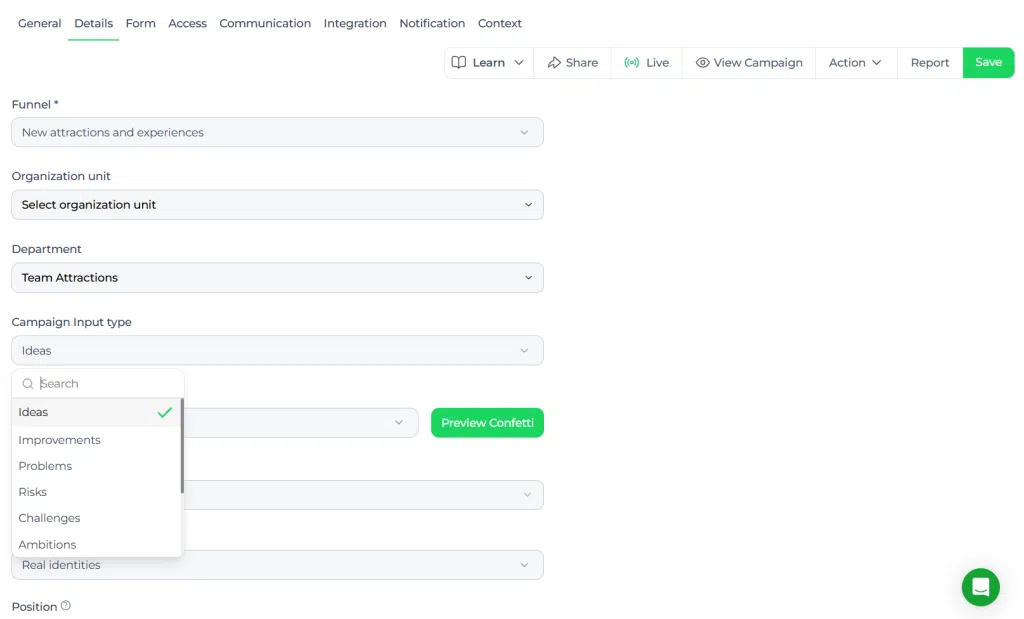
The campaign input type is a Mission setting that defines what kind of submissions a Mission collects. While missions often collect ideas, this setting can be adjusted to use another input type such as problems, risks, challenges, or goals.
When the input type is changed, all new items submitted to that campaign are categorized under the selected type. The platform labels are also updated to match the chosen campaign input type.
Access level #
You need permission to manage Mission settings before you can change the campaign input type.
Navigation path #
Navigation path: Innovation Studio → Idea collecting → Campaigns → Open Mission → Details
How to use this feature #
The Mission input type should be set based on the purpose of the Mission. If you want participants to submit challenges instead of ideas, or risks instead of solutions, update the Mission input type before or during the Mission setup.
After the setting is changed, new submissions in that Mission will follow the selected type and the labels in the application will reflect that choice.
Step by step instructions #
- Open Innovation Studio.
- Go to Idea collecting
- Select Campaigns.
- Open the campaign you want to update.
- Go to Details.
- Find the Campaign input type setting.
- Select the input type you want to use, such as ideas, problems, risks, challenges, or goals.
- Save the changes.
- Review the Mission to confirm that the labels now match the selected input type.
Configuration and adjustments #
The campaign input type is configured in the Mission details settings. This setting affects how new items are categorized inside that Mission and how the application presents submission labels to users.
Choose a campaign input type that matches the exact purpose of the campaign. This improves submission quality because participants can immediately understand whether the campaign is asking for opportunities, issues, risks, or goals.
If the campaign focus changes over time, review the setting carefully before updating it. A change affects new items added after the update, so it is important to keep the campaign structure and communication aligned.
Practical example – Innovationlands #
Innovationlands launches a campaign on to identify operational issues during peak park hours. In this case, the team does not want to collect Solution ideas first. They want frontline staff to submit operational problems they observe in the park.
The Mission owner opens the campaign details and changes the campaign input type from Ideas to Problems. From that point on, the campaign labels are updated so participants understand they should submit problems instead of proposed solutions.
This helps Innovationlands collect clearer input from park staff, which can then be reviewed, grouped, and turned into improvement initiatives or follow-up idea campaigns later in the process.



 English
 Dutch
Dutch Portuguese
 Spanish
 French
 German
 Arabic