
 Doc Summary
Why this feature is needed #
Idea funnels can become difficult to manage when multiple ideas cover the same topic, overlap heavily, or should no longer stay active in the funnel. Power users need a controlled way to clean up the funnel without losing structure around submitters, points, and related idea history.
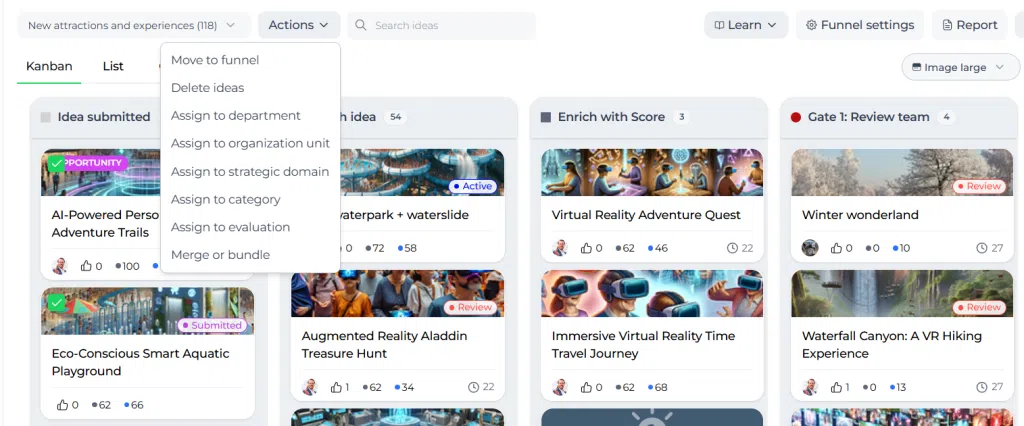
In Accept Mission, this cleanup is done through the Actions menu inside an idea funnel. The most important choices are merge or bundle, but users also need to understand when archive or delete is the better option.
What this feature is #
This feature allows power users to manage selected ideas in an idea funnel from the Actions menu in Innovation Studio. You can select multiple ideas in the Kanban overview or list view and then apply a bulk action.
The cleanup options covered in this article are:
- Merge or bundle to connect related ideas
- Archive to remove an idea from active visibility while keeping it recoverable
- Delete ideas to permanently remove ideas from the system
The Actions menu also includes other operational actions such as moving ideas to another funnel or assigning ideas to a department, organization unit, strategic domain, category, or evaluation. This article focuses on the cleanup actions used to reduce overlap and keep the funnel manageable.
How to Merge and Bundle in 5 min #
Access level #
You need permission to manage ideas inside the relevant idea funnel.
Navigation path #
Navigation path: Innovation Studio → Idea Management → Open idea funnel → Kanban overview or list view → Select ideas → Actions
How to use this feature #
To use cleanup actions, first select the ideas you want to manage. In Kanban view, use the checkboxes on the idea cards. In list view, use the checkboxes on the idea records. After selecting the items, open the Actions menu.
You need to select at least two ideas to use Merge or bundle. You can select more than two ideas if needed.
Choose carefully before confirming the action. Merge and bundle both create parent-child relationships, but they do not behave the same way. Archive hides an idea from active visibility but keeps it recoverable. Delete removes it permanently.
Step by step instructions #
- Open Innovation Studio.
- Go to Idea Management.
- Open the relevant idea funnel.
- Select the ideas you want to clean up in either the Kanban overview or the list view.
- Open the Actions menu.
- Choose the relevant action:
- Merge or bundle
- Delete ideas
- Or another management action if needed
- Confirm the action after reviewing the impact on funnel visibility and structure.
Compare the cleanup options #
| Option | What it does | When to use it | Result in the funnel | Can it be restored? |
|---|---|---|---|---|
| Merge | Combines selected ideas into one existing parent idea. One selected idea becomes the parent and the other selected idea or ideas become child ideas. | Use when the selected ideas are duplicates or are clearly about the same topic and should continue as one idea. | The parent idea remains visible in the funnel. Child ideas are no longer shown separately in the funnel. | No direct reverse action is described. Review carefully before confirming. |
| Bundle | Creates a new parent idea and places the selected ideas underneath it as child ideas. | Use when multiple ideas belong together but should be grouped under a new combined parent idea. | The new parent idea is visible in the funnel. Child ideas are no longer shown separately in the funnel. | No direct reverse action is described. Review carefully before confirming. |
| Archive | Removes an idea from active visibility in the system while keeping it available for later restoration. | Use when an idea should no longer be active but may still need to be restored later. | The archived idea is no longer visible in active funnel views. | Yes. Archived ideas can be unarchived. |
| Delete | Permanently removes an idea from the system. | Use when the idea should not remain in the system at all. | The deleted idea is removed from the funnel and from the system. | No. Deletion is permanent. |
Use merge when one idea should remain #
Merge is the best choice when several selected ideas are effectively the same idea and one of the existing ideas should continue as the main record.
- Select at least two ideas.
- Open the Actions menu.
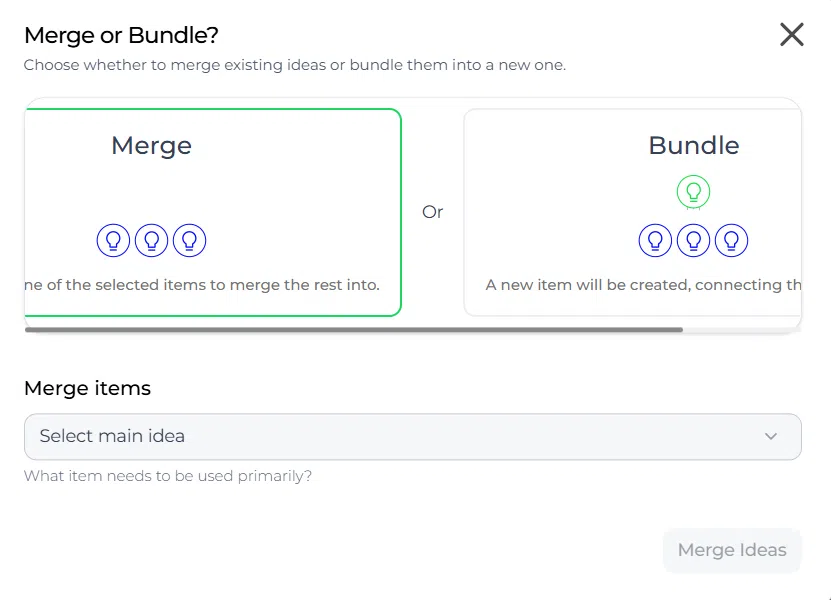
- Choose Merge or bundle.
- Select the merge option.
- Choose which selected idea becomes the parent.
- Confirm the action.
After merging, the parent idea remains visible in the funnel. The other selected ideas become child ideas and are no longer visible there as separate items. The child ideas still keep their connection to submitters, points, and levels.
Use bundle when you need a new parent idea #
Bundle is the best choice when several ideas are related, but none of the existing ideas should become the main record. Instead, Accept Mission creates a new parent idea above them.
- Select at least two ideas.
- Open the Actions menu.
- Choose Merge or bundle.
- Select the bundle option.
- Create or confirm the new parent idea.
- Confirm the action.
After bundling, the new parent idea is shown in the funnel. The original selected ideas become child ideas under it and are no longer visible separately in the funnel.
This is useful when ideas A, B, and C all contribute to a broader concept, but you want the funnel to continue with one new combined idea instead of picking one original idea as the main record.
Use archive when an idea should be hidden but kept #
Archive is the right choice when an idea should disappear from active views, but you do not want to remove it permanently.
- Select the idea or ideas to archive.
- Open the relevant action menu.
- Choose Archive.
- Confirm the action.
Archived ideas are no longer visible in active funnel views. They can still be restored later by unarchiving them.
Use delete when an idea should be removed permanently #
Delete is the right choice when an idea should no longer exist in the system.
- Select the idea or ideas to delete.
- Open the Actions menu.
- Choose Delete ideas.
- Confirm the deletion carefully.
Deleted ideas are permanently removed and cannot be restored.
Important behavior to understand #
- In merge, the selected ideas are combined into one existing parent idea.
- In bundle, the selected ideas are grouped under one new parent idea.
- In both merge and bundle, child ideas are no longer visible as separate items in the funnel.
- If ideas were originally submitted through a campaign, the original submitted ideas remain visible in that campaign context even when they are no longer shown separately in the funnel.
- Points, levels, and related submitter connections remain intact for child ideas after merge or bundle.
- Archived ideas are hidden from active visibility but can be restored.
- Deleted ideas are removed permanently from the system.
Configuration and adjustments #
No separate configuration is required to use these actions beyond the correct permissions in Idea Management. Because these actions affect funnel structure, visibility, and governance, they should only be used by power users responsible for keeping the funnel clean and accurate.
Practical example – Innovationlands #
Innovationlands is reviewing a funnel in Innovation Studio for visitor experience improvements. The funnel contains several ideas about reducing waiting frustration in the park. Two of the ideas describe almost the same Solution for showing queue times on digital signage. In that case, the team uses merge so one of those ideas stays as the parent and the duplicate becomes a child idea.
The same funnel also contains three broader ideas about queue updates in the mobile app, digital signage, and proactive family notifications. These are related but not duplicates. The team uses bundle to create a new parent idea called Connected queue communication. The three original ideas become child ideas under that new parent.
Later, one outdated idea about a retired park concept is no longer relevant to active review. The team archives it so it disappears from the active funnel but remains recoverable. A separate test idea created by mistake is removed using Delete ideas.
This helps Innovationlands keep the funnel focused while preserving contributor recognition, Decision context, and a clean structure for evaluation and next-step decisions.



 English
 Dutch
Dutch Portuguese
 Spanish
 French
 German
 Arabic