
 Doc Summary
Why this feature is needed #
When a funnel contains many ideas, teams need a quick way to identify which ideas may be the most promising to review first. Without that overview, it can be difficult to decide where to focus evaluation time.
The Opportunity score filter helps power users and admins work faster by grouping ideas based on their estimated potential. This supports prioritization and helps teams focus attention on ideas that may deserve earlier review.
What this feature is #
Opportunity score is a funnel-level score view that helps identify which ideas may have the strongest potential. It is based on an AI service that combines many variables, scores, and interactions to estimate how interesting an idea is to evaluate first.
This score uses more than 50 variables and combines signals from other available scores and activity in the funnel. Because of this, it is one of the strongest prioritization views available in the funnel.
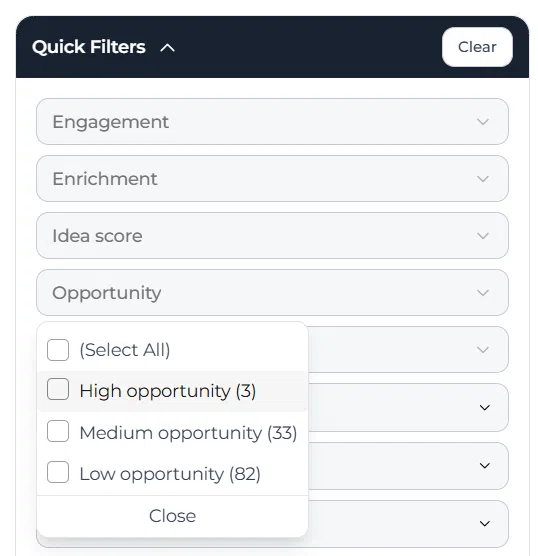
Within the funnel filters panel, the Opportunity filter groups ideas into Select all, High opportunity, Medium opportunity, and Low opportunity. This allows teams to focus on ideas based on their estimated opportunity level without opening ideas one by one.
Access level #
You need access to the relevant funnel in the Innovation Studio to use the Opportunity score filter.
Navigation path #
Navigation path: Innovation Studio → Funnels → Open funnel → Filters
How to use this feature #
The Opportunity score filter is used directly from the funnel view. It helps you quickly focus on ideas with higher estimated potential, while also making it easy to review medium or lower opportunity ideas when needed.
This is useful during shortlist preparation, early review rounds, and prioritization sessions where the team wants to decide which ideas to evaluate first.
Step by step instructions #
- Open Innovation Studio.
- Go to Funnels.
- Open the funnel you want to review.
- Click Filters.
- In the filters panel, open Opportunity.
- Select one of the available filter options: Select all, High opportunity, Medium opportunity, or Low opportunity.
- Review the filtered set of ideas in the funnel.
- Adjust the filter when you want to switch between different opportunity levels.
What the opportunity score is based on #
Opportunity score is calculated by an AI service that looks at a wide range of signals to estimate which ideas may be most interesting to evaluate first.
The score uses more than 50 variables. It also uses other scores in the funnel as input, together with additional interaction and idea-related data.
Because it combines many signals, Opportunity score is best used as a prioritization aid. It helps point reviewers toward potentially strong ideas, but it should still be used together with human judgment and structured evaluation.
Available filter options #
Select all #
Shows all ideas in the funnel regardless of opportunity level.
High opportunity #
Shows ideas with the highest estimated potential. This is useful when preparing a shortlist or identifying which ideas should be reviewed first.
Medium opportunity #
Shows ideas with a moderate estimated potential. These ideas may still be valuable and often deserve further enrichment or discussion.
Low opportunity #
Shows ideas with a lower estimated potential. This can help teams identify ideas that may need stronger enrichment, better scoring, or further validation before moving forward.
How this helps in funnel management #
The Opportunity score filter helps teams focus their review effort more efficiently. Instead of reviewing all ideas in the same order, they can start with ideas that the system estimates as having stronger potential.
This makes the funnel easier to manage during prioritization and can help teams move promising ideas into scoring, enrichment, or Decision steps more quickly.
Configuration and adjustments #
The Opportunity score filter is available directly in the funnel filters panel. It does not require separate setup in the funnel view itself, but it depends on the overall data quality of the funnel and the other available scores and interactions that feed the AI model.
If the opportunity view is not helpful enough in practice, review the completeness of idea content, the scoring setup of the funnel, and how consistently ideas are being enriched and evaluated. Stronger input quality improves the usefulness of AI-supported prioritization.
Use this filter together with other funnel filters when you want to narrow the review to a more specific set of ideas, such as one Lane, one owner, or one strategic theme combined with opportunity level.
Practical example – Innovationlands #
Innovationlands is reviewing ideas in its New attractions funnel before the quarterly portfolio meeting. The innovation team wants to focus first on the concepts that appear most promising based on the available funnel data.
The reviewer opens the funnel, clicks Filters, and expands Opportunity. First, they use High opportunity to identify the ideas that may deserve early review. After discussing these ideas, they switch to Medium opportunity to identify concepts that may still become strong candidates after additional enrichment.
This helps Innovationlands structure its review time more effectively and focus Decision-making on ideas with stronger potential while still keeping other ideas visible for future follow-up.



 English
 Dutch
Dutch Portuguese
 Spanish
 French
 German
 Arabic