
 Doc Summary
Rich text editor in properties #
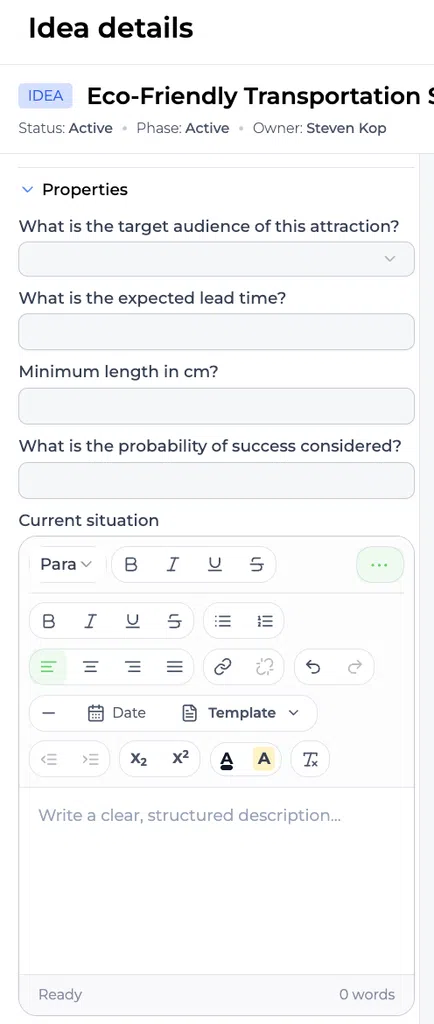
Properties can use a rich text editor when users need to provide structured descriptive content instead of a short single-line value.
The editor helps users add readable content such as paragraphs, emphasis, lists, and links. This is useful when the information cannot be captured effectively with a dropdown, number, percentage, date, or short text field.
When to use a rich text Property #
Use a rich text Property when users need to explain, document, or support an answer with additional context.
Good examples include:
- Customer Problem statement
- Implementation approach
- Business case
- Research evidence
- Expected impact explanation
- Risks and assumptions
- Lessons learned
- Project Decision rationale
Use a structured field instead when the value needs to be compared or used in reporting. For example, use a percentage for feasibility, a number for expected lead time, or a dropdown for Risk level.
How to use the rich text editor #
- Open the relevant idea or project.
- Open the Property that uses rich text.
- Enter the content in the editor.
- Use the available formatting tools to structure the content.
- Add a link when supporting information is available.
- Review the content before saving or leaving the page.
Keep the content focused and easy to scan. Use short paragraphs and lists rather than one long block of text.
Pasting content into the editor #
When you paste copied content into a rich text Property, the Paste content dialog gives you two choices:
- Keep formatting preserves useful formatting such as links, emphasis, lists, and paragraph structure.
- Plain text removes the copied formatting and keeps only the words.
You can paste plain text directly with Ctrl + Shift + V on Windows or Cmd + Shift + V on Mac.
Example #
A rich text Property called Implementation approach could contain:
- Phase 1: Validate the technical requirements
- Phase 2: Test the concept with a small user group
- Phase 3: Prepare the rollout plan
The Property could also include a link to the team’s implementation checklist.
A Property called Customer Problem could include a short Problem statement, the affected user group, supporting research, and a link to the source interview notes.
Recommended practice #
Use rich text to add meaningful context, not to replace every structured field. A strong Property setup often combines:
- Rich text for explanations and evidence
- Dropdowns for consistent categories
- Numbers or percentages for measurable values
- Dates and times for planning information
This combination gives users space to explain an item while keeping important data easy to compare and report on.
Related article #
For guidance on creating and connecting properties to a funnel, see Properties: Functional Overview.



 English
 Dutch
Dutch Portuguese
 Spanish
 French
 German
 Arabic