
 Doc Summary
Why this guide is needed #
This guide helps new users understand how Accept Mission works as a platform. It is not a setup article or a configuration article. It is a practical overview that helps clients understand the main environments, the core tools, and how ideas move from participation to Decision-making and execution.
Use this guide when you want to get familiar with the platform before working with missions, idea funnels, selections, canvases, dashboards, or projects.
What this guide is #
This quick start guide is a platform overview for Accept Mission. It introduces the main purpose of the platform, explains the difference between the Innovation Portal and Innovation Studio, and shows how the main tools support innovation from idea collection to portfolio management.
Accept Mission is an innovation management platform that supports idea collecting, idea management, and project portfolio management. Contributors mainly use the Innovation Portal to participate, while power users and admins use Innovation Studio to structure workflows, evaluate ideas, and manage progress.
Access level #
Prerequisite: You need access to your organization’s Accept Mission environment. Some parts of this guide also describe tools that are only available to Power Users or Admins.
How to use this guide #
This guide gives you a structured overview of the platform. Start by understanding the main environments, then review the tools your organization uses. The overview video introduces the complete innovation workflow, while the available product tours explain specific tool areas in more detail.
Introduction: What is Accept Mission #
Accept Mission is an idea and innovation management platform. It helps organizations collect ideas, enrich them, evaluate them, select the strongest opportunities, and follow them through execution and reporting.
The platform supports organizations that want to work with innovation in a structured way. This includes collecting ideas from people, organizing evaluation workflows, supporting collaboration, and managing innovation projects in a portfolio view.
1. Quick Overview
Conceptual overview #
Accept Mission is built around two main working environments.
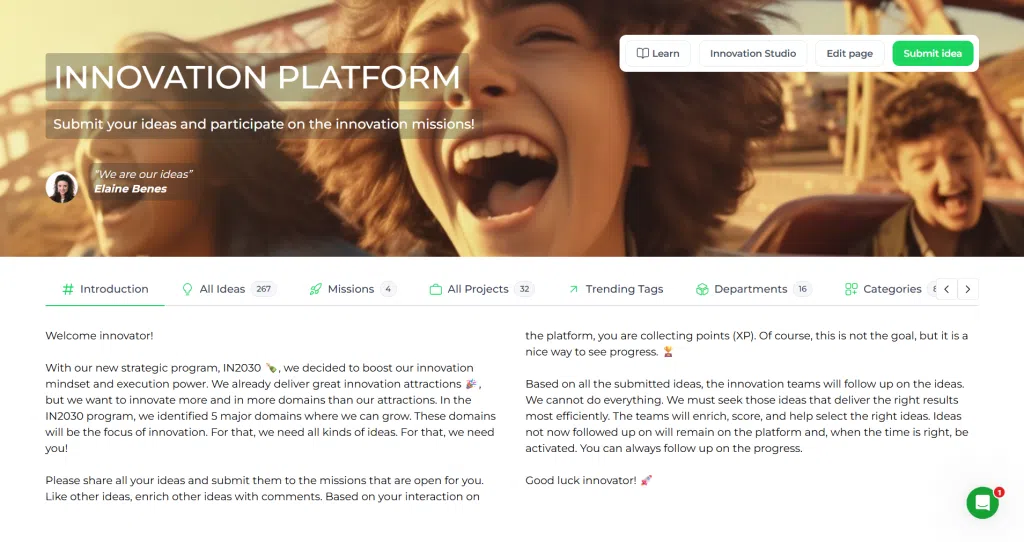
- Innovation Portal: The participation environment for users, guest users, admins, and super admins. This is where people can discover missions, submit ideas, and interact with innovation activities.
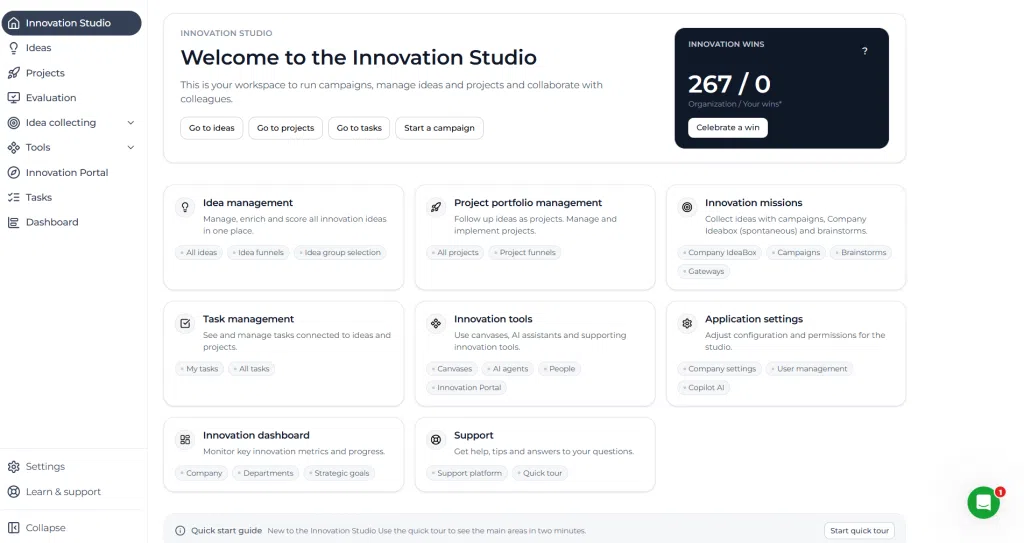
- Innovation Studio: The management environment for admins and super admins. This is where managers create missions, invite users, manage settings, review dashboards, and steer ideas and projects through funnels and portfolios.
Admin users can switch between these environments from their profile menu by using the switch view option.

Innovation Dashboard #
The Innovation Dashboard gives managers a view of activity, progress, and performance across the platform. It helps users monitor idea flow, Decision progress, and the current state of the innovation pipeline.
Dashboards are mainly used in Innovation Studio by people who oversee innovation processes and need visibility across campaigns, funnels, and projects.
Idea management #
Idea management is where ideas are structured, enriched, reviewed, and prioritized after they are collected. This usually happens in idea funnels where ideas move through stages such as intake, validation, scoring, and Decision.
This part of the platform helps teams focus on Decision quality instead of only collecting large numbers of ideas.
Missions #
Missions are used to collect ideas from people inside or outside the organization. They provide a structured way to gather input around a need, topic, or challenge.
Accept Mission supports different Mission types depending on the goal of the activity.
Company IdeaBox #
The Company IdeaBox is used for spontaneous ideas. It gives users a continuous channel to submit innovation input outside a specific campaign.
Campaigns #
Campaigns are used when an organization wants to collect ideas around a specific challenge, theme, or business question. They are useful when idea collection needs focus and clear evaluation context.
Brainstorming #
Brainstorming is used for quick collaborative idea generation with a team. It supports live participation and helps teams generate options before selecting which ideas should continue into a more structured workflow.
Canvases #
Canvases help users structure ideas and projects in a more detailed and consistent way. They are useful when teams need to describe an opportunity clearly, explore assumptions, or prepare stronger Decision input.
Canvases support enrichment and make it easier to compare opportunities with shared structure.
Selection #
Selection supports group Decision-making. It helps teams compare ideas or initiatives, apply evaluation logic, and make transparent choices about what should move forward.
This is often used after ideas have been enriched and scored in a funnel.
Projects #
Projects are used to manage approved innovations after they have passed through idea evaluation and selection. This makes it possible to continue tracking ownership, progress, and performance after the Decision to move forward has been made.
Projects connect Decision-making with execution and portfolio oversight.
Step by step instructions #
- Sign in to Accept Mission using your organization’s access method.
- Open the Innovation Portal to review available missions, activities, and idea participation options.
- Use the quick overview and introduction sections of this guide to understand the main purpose of the platform.
- Review the Mission types to understand how your organization collects ideas.
- Open or submit an idea to understand how participation works in practice.
- If you have the correct permissions, switch to Innovation Studio to explore dashboards, idea funnels, selections, canvases, and projects.
- Use the video sections in this guide to learn each tool area in more detail.
- Return to the relevant tool when you are ready to start participating or managing innovation work.
Practical example – Innovationlands #
At Innovationlands, a contributor starts in the Innovation Portal and sees an active campaign focused on improving guest flow in Innovationlands World. The user submits an idea for better digital queue guidance and follows the campaign through the portal.
In Innovation Studio, the innovation team reviews the submitted idea in an idea funnel, enriches the description, and applies scoring criteria such as guest value, feasibility, and strategic fit. During selection, the team compares this idea with other proposals and decides whether it should move forward.
If approved, the idea is turned into a project so Innovationlands can track delivery, ownership, and results. This example shows how the quick start guide helps users understand the full path from participation to Decision and execution.
Contact details #
For additional help, contact the Accept Mission support team.
- Email: [email protected]
- Website: www.acceptmission.com
- LinkedIn: https://www.linkedin.com/company/accept-Mission



 English
 Dutch
Dutch Portuguese
 Spanish
 French
 German
 Arabic