
 Doc Summary
Why this feature is needed #
Most innovations do not start with one perfectly defined Problem. Teams often discover several related issues, symptoms, and challenges before they understand which Problem really matters most.
Without a structured way to capture those problems, teams can jump too quickly to a Solution or lose focus during discovery. Innovation problems help teams register all relevant problems first and then decide which one should be treated as the primary Problem.
What this feature is #
Innovation problems in Accept Mission are part of the broader innovation intelligence feature and help teams register, structure, and prioritize the problems connected to an innovation.
This feature can be used for both ideas and projects. It allows users to create a list of problems related to the same innovation and then identify which one is the main Problem. This gives teams a more complete view of the Problem space before they make decisions about Solution direction or next steps.
Once a primary Problem is selected, it becomes part of the innovation summary and helps keep the innovation focused on the right challenge.
Access level #
You need access to the relevant idea or project in the Innovation Studio to work with innovation problems.
Navigation path #
Navigation path: Innovation Studio → Ideas → Open funnel → Open idea → Work → Problems
How to use this feature #
Innovation problems are used inside ideas and projects to capture all relevant problems connected to the innovation. Teams can add problems quickly with only the essentials, or describe them in more detail when more context is needed.
After multiple problems are listed, the team can indicate which Problem is the primary one. This helps the innovation stay focused and improves clarity for Decision-making.
Step by step instructions #
- Open Innovation Studio.
- Choose whether you want to work inside an idea or a project.
- Open the relevant idea or project.
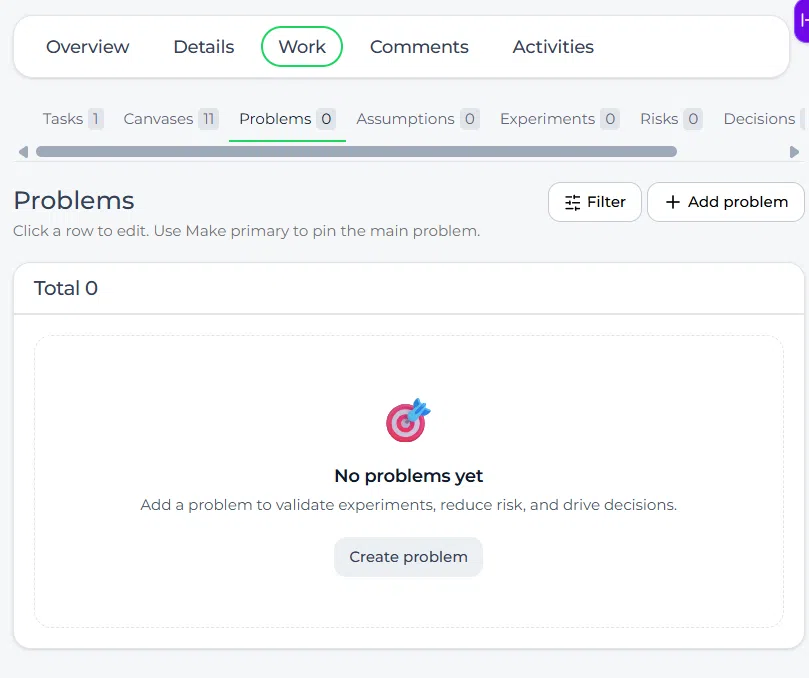
- Go to the Work tab.
- Open the Problems tab.
- Add a new Problem.
- Enter the Problem title.
- Add more detail if needed.
- Save the Problem.
- Repeat this for all relevant problems connected to the innovation.
- Select which Problem should be marked as the primary Problem.
- Review the innovation overview to confirm that the main Problem is shown as part of the summary.
How innovation problems work #
Within an idea or project, users can create a list of problems related to that innovation. This helps teams capture the full Problem space before narrowing the focus.
A Problem can be added in a simple way by entering only the title, or it can be worked out in a more advanced and detailed way when more context is needed. This gives teams flexibility during early exploration and later validation.
Primary Problem #
One of the key functions of this feature is the ability to indicate which Problem is the primary Problem.
This is important because an innovation may involve several symptoms, side effects, or related challenges, but usually one Problem should be treated as the central focus. Marking a primary Problem helps the team align on what really matters most.
Where the main Problem appears #
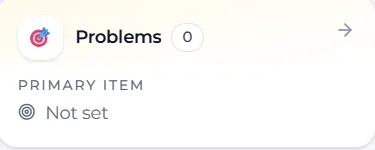
After a primary Problem has been selected, it becomes visible in the innovation itself.
When you open the related idea or project and go to the Overview tab, the main Problem is shown there as a summary. This helps users immediately understand the core issue connected to that innovation.
Why this helps teams #
The innovation problems feature helps teams move from loose observations to a clearer and more structured Problem definition.
This is especially useful for:
- Early-stage discovery where multiple issues still need to be explored
- Innovation teams working with several assumptions that may relate to different problems
- Problem validation processes where teams need to confirm the real challenge
- Structuring discussions before choosing a Solution
- Improving focus during Decision-making
Innovation intelligence feature page #
Innovation problems are one of the tools within the broader Innovation intelligence feature. This broader feature helps teams capture structure, insights, decisions, and learning directly inside ideas and projects.
Configuration and adjustments #
Innovation problems are available in both ideas and projects, which means the same structured Problem approach can be used during exploration and during execution.
To work with this feature in ideas, follow this path:
Navigation path: Innovation Studio → Ideas → Open funnel → Open idea → Work → Problems
To work with this feature in projects, follow this path:
Navigation path: Innovation Studio → Projects → Open project → Work → Problems
To keep this feature useful, teams should capture all relevant problems first and only then decide which one is primary. This improves focus and reduces the Risk of solving the wrong challenge too early.
Practical example – Innovationlands #
Innovationlands is exploring a new guest experience improvement for one of its parks. At first, the team identifies several related issues: long waiting times, unclear queue communication, lack of entertainment during waiting, and poor visibility of alternative options in the park.
Inside the idea, the team opens the Problems tab in the Work area and registers all of these issues as separate problems. During discussion, they decide that the main Problem is not only waiting itself, but the lack of clear and reassuring queue communication for guests.
The team marks that issue as the primary Problem. After that, when other users open the idea and go to the Overview tab, they can immediately see the main Problem in the summary. This helps Innovationlands keep the innovation focused on the right challenge before moving further into Solution design and validation.



 English
 Dutch
Dutch Portuguese
 Spanish
 French
 German
 Arabic