
 Doc Summary
Evaluations help teams compare multiple ideas in a structured way before making a Decision. They are useful when you want invited participants to score ideas against shared criteria and review the results in one report.
Why this feature is needed #
When several ideas compete for attention, informal discussion often makes it hard to compare them consistently. An evaluation creates a clear scoring process so multiple people can assess the same ideas using the same Scorecard. This supports more transparent Decision-making and helps teams move stronger ideas forward with better evidence.
What this feature is #
An evaluation is a structured Decision activity in Innovation Studio. It lets a Power User define the evaluation details, add ideas, invite evaluators, select the published Scorecard that should be used, manage communication, and launch the process. After scoring is complete, the evaluation report shows the results so the team can compare ideas and prepare a selection Decision.
Access level #
You need permission to access Innovation Studio and create or manage evaluation records. Invited evaluators can participate in scoring after they are added to the evaluation.
Navigation path #
Navigation path: Innovation Studio → Evaluation
How to use this feature #
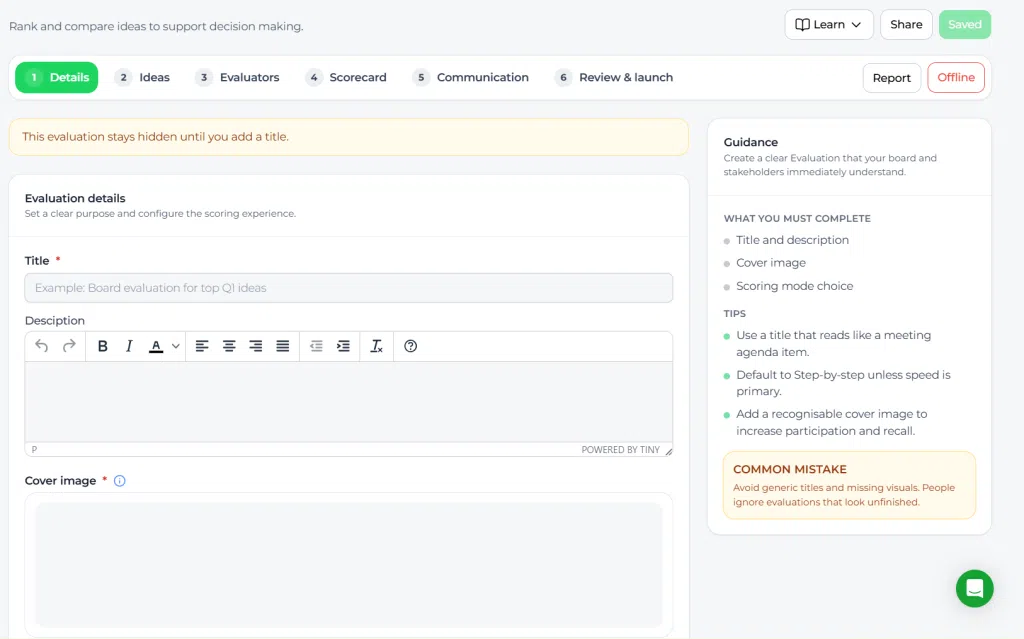
The evaluation workspace is organized as a step-based flow. You first create the evaluation, then complete the required setup across the tabs: Details, Ideas, Evaluators, Scorecard, Communication, and Review & launch. An evaluation stays hidden until the required setup is completed and it is launched.
Step by step instructions #
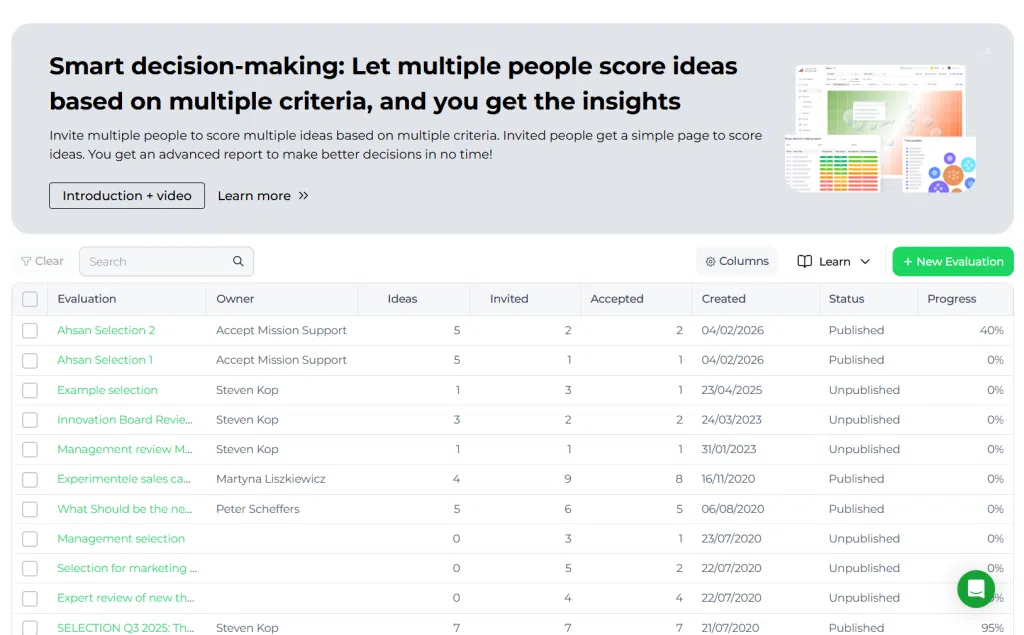
- Open Innovation Studio → Evaluation.
- Select New Evaluation to create a new evaluation.
- In Details, enter a clear title that describes the Decision you are preparing.
- Add a description that explains the purpose of the evaluation and what evaluators should consider.
- Upload a cover image so the evaluation is recognizable to invited participants.
- Choose the scoring mode for the evaluation. Use the mode that matches how you want evaluators to assess ideas.
- Open the Ideas step and add the ideas that should be compared.
- Open the Evaluators step and invite the people who should score the ideas.
- Open the Scorecard step and confirm which criteria and scoring logic will be used.
- Open the Communication step and prepare the message or invitation flow for participants.
- Open Review & launch and verify that all required sections are complete.
- Launch the evaluation to make it available for invited evaluators.
- After launch, monitor participation and progress from the evaluation overview.
- When scoring is complete, open the Report to compare results and support the final Decision.
Configuration and adjustments #
The evaluation itself is configured inside the step flow. The most important adjustments are the title, description, cover image, included ideas, invited evaluators, and Scorecard setup. Changes to these settings affect how participants experience the evaluation and how results can be compared.
If the Scorecard or scoring criteria need to be changed before launch, update them in the Scorecard step of the evaluation. If your organization manages reusable scoring logic centrally, make sure the selected Scorecard matches the Decision context before inviting evaluators.
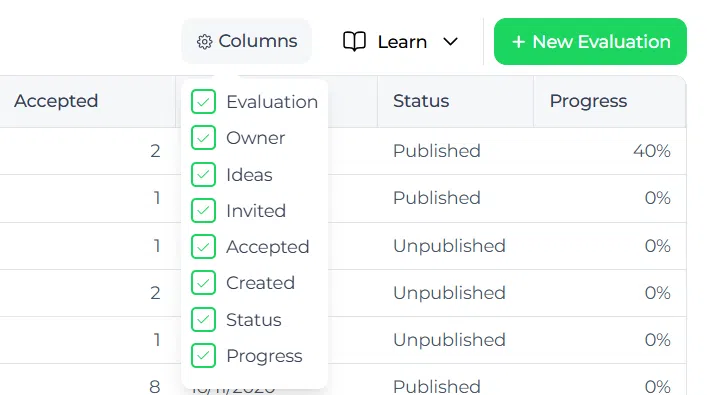
Use the Columns option in the evaluation overview to adjust which list data is visible for monitoring and follow-up.
Practical example – Innovationlands #
Innovationlands wants to decide which guest experience ideas should move forward for the next seasonal improvement cycle. A Power User in Innovation Studio creates an evaluation called Board evaluation for top Q1 ideas.
In the Ideas step, the team adds five shortlisted ideas from the funnel, such as a virtual queue improvement, a family wayfinding concept, and a personalized guest offer concept. In the Evaluators step, the Power User invites representatives from park operations, guest experience, and commercial leadership.
In the Scorecard step, Innovationlands uses criteria such as guest value, operational feasibility, implementation effort, and commercial impact. After launch, evaluators score each idea using the same criteria. The report shows which ideas perform strongest across the combined scores. Based on that result, Innovationlands can make a clearer selection Decision and move the top idea into the next execution step.



 English
 Dutch
Dutch Portuguese
 Spanish
 French
 German
 Arabic