
 Doc Summary
Why this feature is needed #
Evaluations help organizations collect structured scores from selected people before deciding which ideas should move forward. These evaluators can be a management team, jury, expert group, department, or a wider audience.
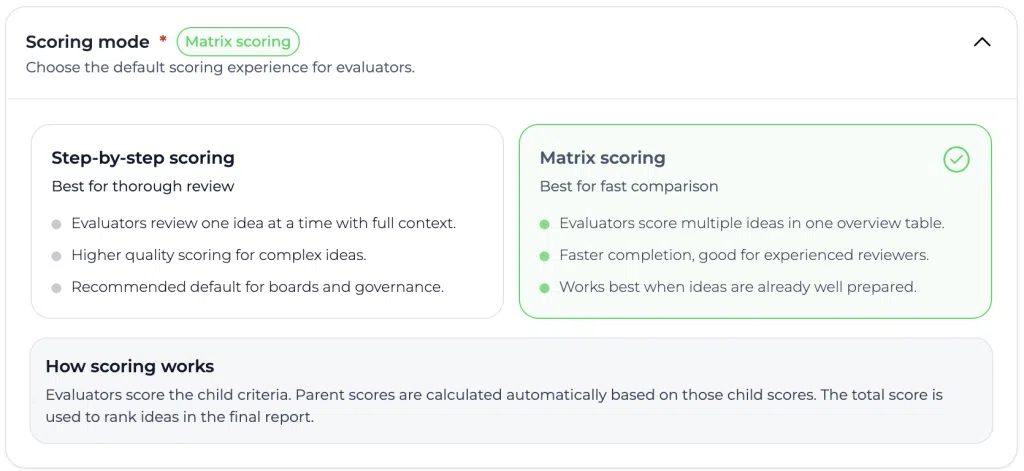
In some evaluations, scoring ideas one by one is useful because it gives evaluators a guided step by step experience. In other situations, evaluators need to compare multiple ideas at once. The Decision matrix scoring view supports this by showing all assigned ideas and Scorecard criteria in one overview.
This makes the evaluation process faster when evaluators need to score several ideas against the same Scorecard and compare them while scoring.
What this feature is #
The Decision matrix in evaluations is a scoring view that allows evaluators to score assigned ideas in a matrix layout. Instead of opening each idea page by page, evaluators can see all ideas in one overview and score them directly against the assigned Scorecard.
An evaluation is built around three elements:
- Ideas that need to be evaluated.
- A Scorecard with the scoring criteria.
- Evaluators who are invited or assigned to score the ideas.
After evaluators complete their scoring, the results are collected and presented in the evaluation report. This report helps the evaluation owner review outcomes, compare scores, and support the next Decision step.
Platform area #
Innovation Studio
Access level #
Power Users can create and manage evaluations when they have access to the relevant evaluation tool and idea data. Evaluators only need access to the evaluation they are invited to complete.
Navigation path #
Navigation path: Innovation Studio → Evaluations → Open evaluation → Decision Matrix (first tab)
How to use this feature #
The evaluation owner prepares the evaluation by selecting the ideas, assigning a Scorecard, and selecting the evaluators. The evaluator can then complete the scoring in either the step by step scoring view or the Decision matrix view, depending on how the evaluation is configured or presented.
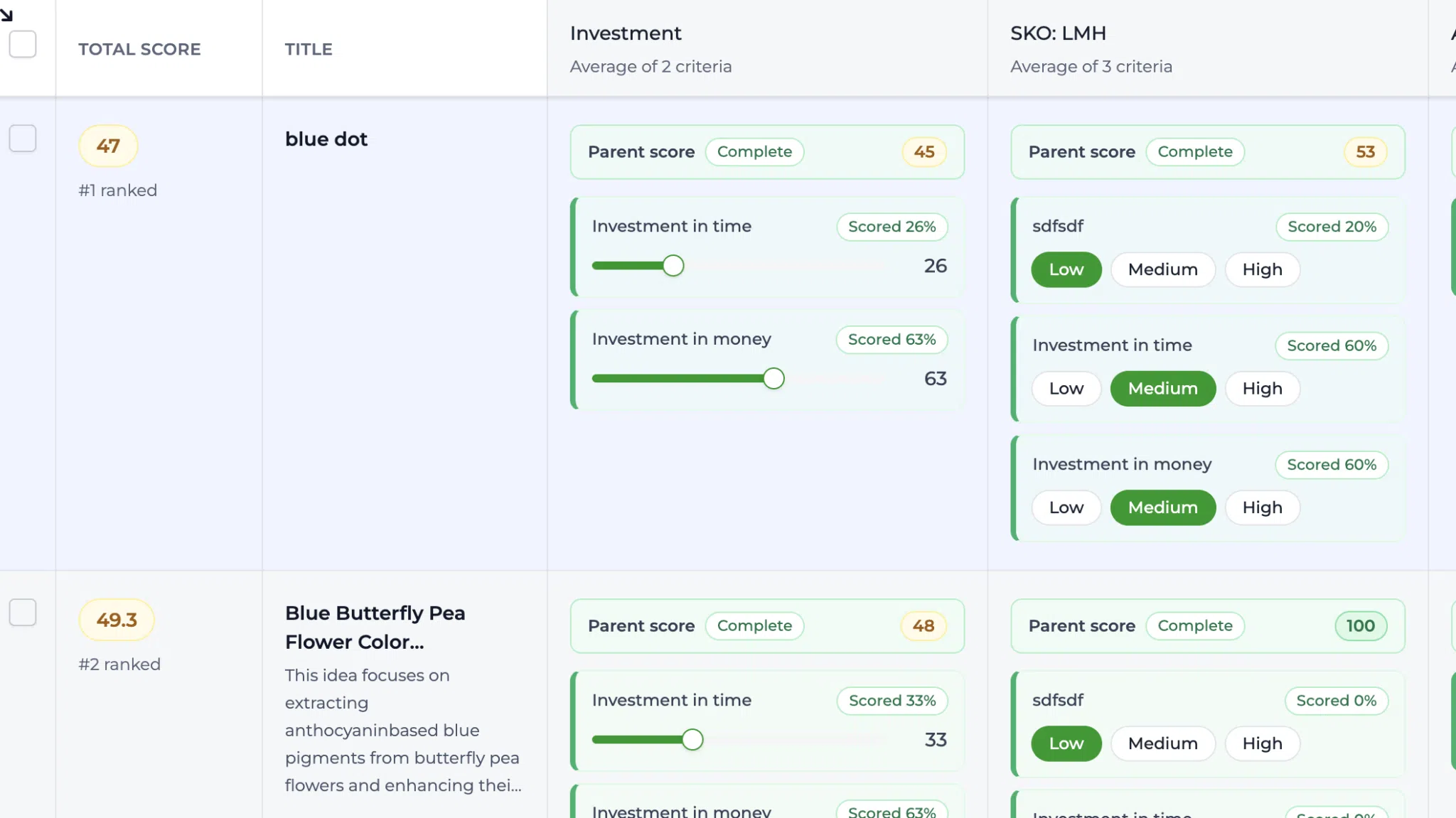
The Decision matrix view shows each assigned idea as a row and each Scorecard criterion as a column. Evaluators can score directly in the matrix and move across ideas and criteria without opening each idea separately.
Step by step instructions #
- Open Innovation Studio.
- Go to Evaluations.
- Create a new evaluation or open an existing evaluation.
- Select the ideas that need to be evaluated.
- Assign the Scorecard that should be used for scoring.
- Select the evaluators who should score the ideas.
- Open or share the evaluation with the selected evaluators.
- Select the Decision matrix scoring view when scoring multiple ideas in one overview.
- Review the idea title and short description for each row.
- Open additional idea details when more context is needed.
- Score each idea using the Scorecard columns.
- Complete all required scores before submitting the evaluation.
- Review the evaluation report after evaluators have submitted their scores.
Understanding the scoring views #
Step by step scoring #
The step by step scoring view guides evaluators through the assigned ideas one page at a time. This is useful when evaluators need a focused scoring experience or when each idea requires careful reading before scoring.
Decision matrix scoring #
The Decision matrix scoring view shows all assigned ideas and Scorecard criteria in one overview. This is useful when evaluators need to compare ideas while scoring or when a larger set of ideas must be scored efficiently.
Understanding the Decision matrix layout #
Idea rows #
Each row represents one idea assigned to the evaluation. The evaluator can review the title and short description to understand what is being scored.
Scorecard columns #
Each Scorecard column represents a scoring criterion from the assigned Scorecard. The evaluator enters or selects scores directly in the cells.
Idea context #
When more information is needed, the evaluator can open the idea details. This may include the full title, full description, comments, strategic alignment, and other available idea information.
Completion status #
The matrix helps evaluators see which scores are complete and which scores still need input. Missing or incomplete scores should be completed before the evaluation is submitted.
Configuration and adjustments #
The evaluation owner controls which ideas, Scorecard, and evaluators are included in the evaluation. These choices determine what each evaluator sees and scores.
Navigation path: Innovation Studio → Evaluations → Create or edit evaluation
The Scorecard itself is configured separately. Changes to the Scorecard can affect the scoring criteria available in evaluations that use that Scorecard.
Navigation path: Settings → Data and structures → Scorecards
Before launching an evaluation, check that the correct ideas are included, the Scorecard matches the Decision criteria, and the right evaluators have been selected.
Practical example: Innovationlands #
Innovationlands wants to evaluate several ideas for improving the guest experience across its theme parks. The innovation team creates an evaluation for a group of park managers and guest experience experts.
The evaluation owner selects ideas such as a virtual queue improvement, a personalized food ordering flow, and a new family route planner. The owner assigns a Scorecard with criteria for guest value, feasibility, commercial impact, strategic alignment, and Risk.
The selected evaluators open the evaluation and use the Decision matrix scoring view. They can see all assigned ideas in one overview and score each idea directly against the same criteria.
After the evaluators submit their scores, the evaluation owner reviews the report. The report shows which ideas scored highest and where the evaluators agreed or differed. The innovation team uses these results to decide which ideas should move to the next funnel stage for further validation or proposal creation.
Best practices #
- Use the Decision matrix scoring view when evaluators need to compare several ideas at the same time.
- Use step by step scoring when each idea requires focused review before scoring.
- Keep the Scorecard clear and limited to criteria that support the Decision.
- Select evaluators who have the right knowledge for the ideas being scored.
- Review completion status before closing the evaluation.
- Use the evaluation report as Decision support, not as a replacement for final governance decisions.



 English
 Dutch
Dutch Portuguese
 Spanish
 French
 German
 Arabic