
 Doc Summary
Why this feature is needed #
Scoring ideas helps teams compare opportunities in a structured way and decide which ideas should move forward. In practice, manual scoring can be slow and inconsistent, especially when multiple evaluators interpret criteria differently.
The AI scoring feature helps apply the same scoring logic across ideas by using the company context, funnel context, and Scorecard setup. This makes evaluations faster and supports more consistent Decision-making inside a funnel.
What this feature is #
AI scoring is a feature in Accept Mission that evaluates an idea automatically based on the Scorecard connected to the funnel. The AI reviews the idea content together with the available context and returns a score with an explanation.
The feature is part of the idea evaluation workflow in the Innovation Studio. It supports Decision-making, but it does not replace human review. Users can use it to speed up evaluations, compare ideas more consistently, and identify areas where an idea needs improvement.
Access level #
Prerequisites:
- Co-pilot must be enabled.
- AI credits must be available.
- The funnel must use a Scorecard.
- Company context and funnel context should be completed for better results.
Navigation path #
Navigation path: Innovation Studio → Funnel → Open idea → Scorecard panel → Score idea
How to use this feature #
AI scoring works on individual ideas inside a funnel. When triggered, the system reads the idea title and description together with the Scorecard criteria and the available company and funnel context. It then generates criterion-based scores and an explanation of the result.
The explanation helps users understand why an idea received a certain score and what could be improved before the next Decision moment.
Step by step instructions #
- Open the Innovation Studio.
- Open the funnel that contains the idea you want to evaluate.
- Select an idea with a clear title and description.
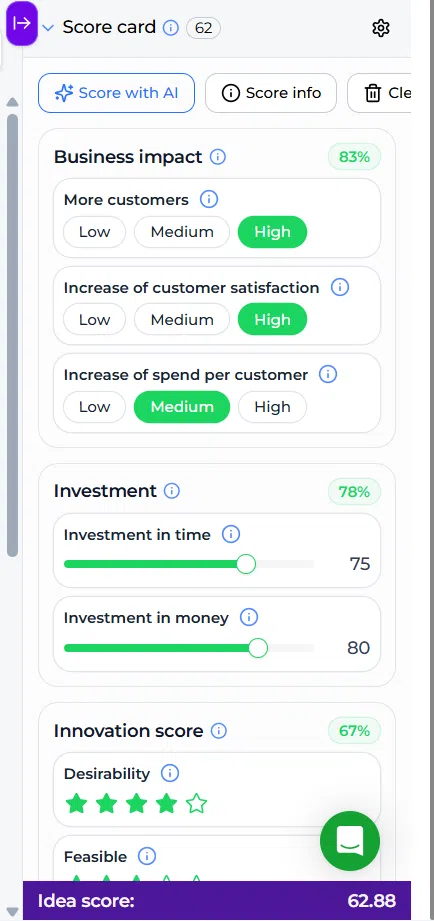
- In the idea detail view, open the Scorecard on the right-hand side.
- Click Score with AI.
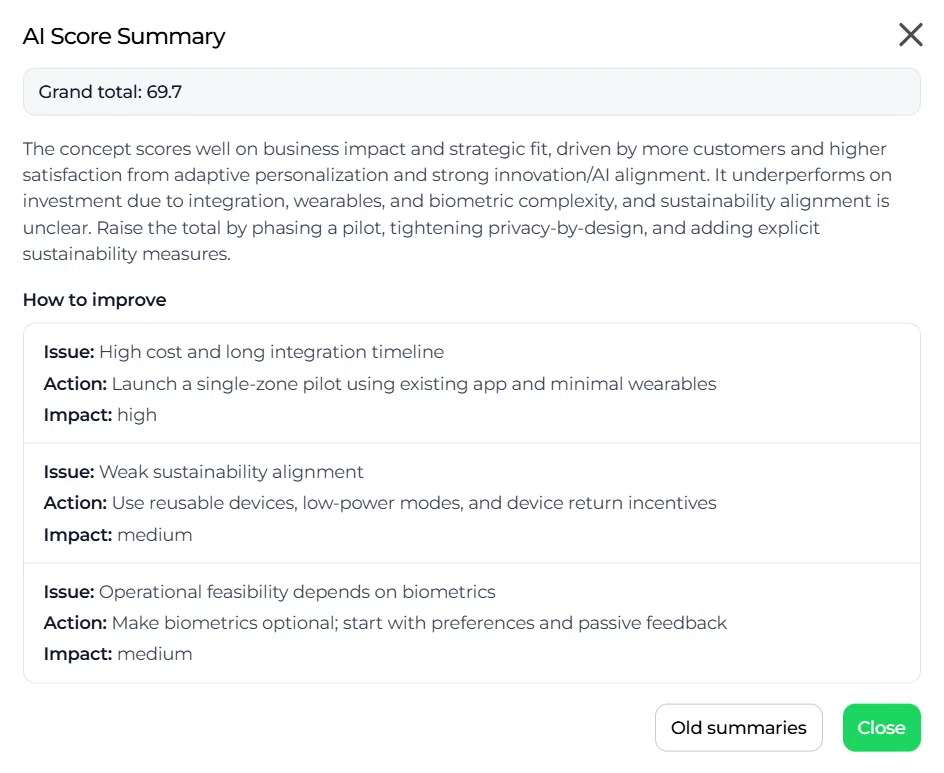
- Review the AI generated score and explanation in the popup.
- Save or confirm the result so the score and explanation remain available on the idea record.
Configuration and adjustments #
AI scoring quality depends on the quality of the configuration behind the funnel. Before using the feature at scale, review the following setup areas.
Prepare the company context #
Complete the company context so the AI understands the broader strategic direction and evaluation boundaries.
Navigation path: Innovation Studio → Settings → Company settings → Context tab
Add relevant company goals, scope, priorities, and background information. This helps the AI judge ideas against the broader business context.
Prepare the funnel context #
Complete the funnel context so the AI understands the objective of the specific funnel.
Navigation path: Innovation Studio → Open funnel → Funnel settings → Context tab
Describe the funnel goal, scope, audience, and targets. This improves the relevance of the scoring output for that funnel.
Design the Scorecard clearly #
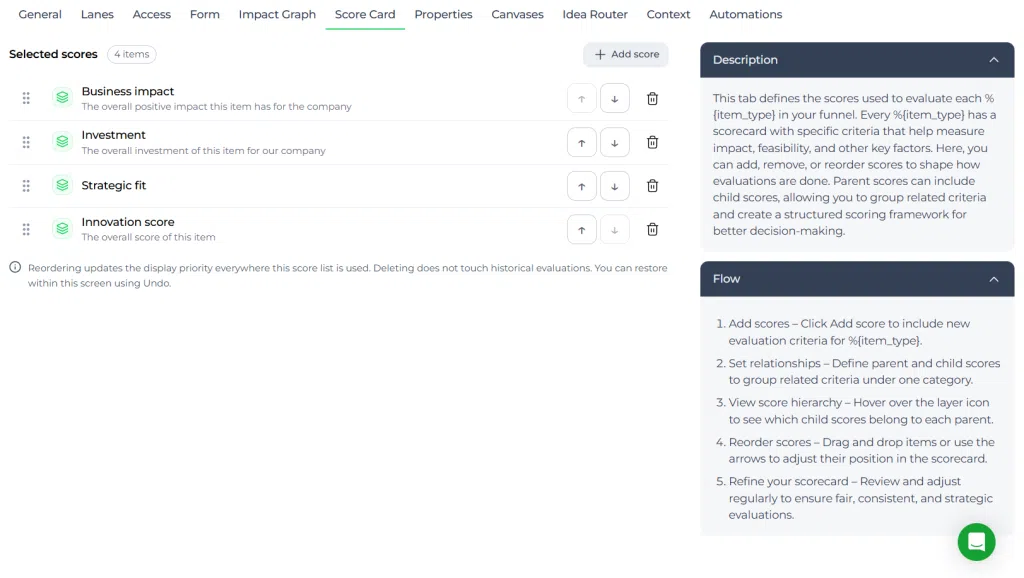
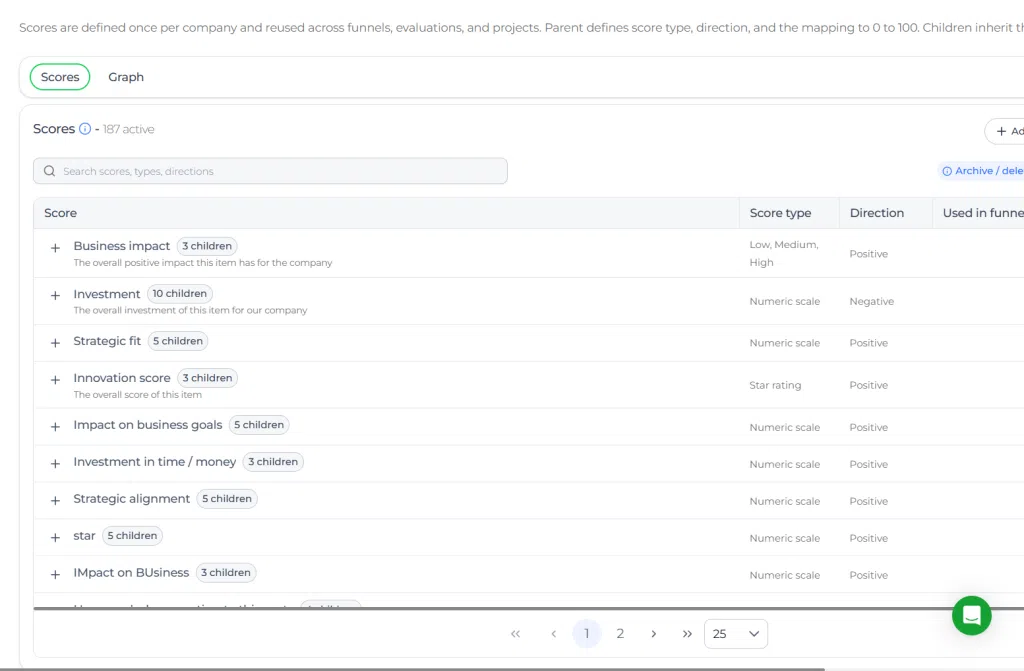
The Scorecard should use clear labels, structured parent and Child Criteria, configurable weights, and helpful tooltips. This supports both users and the AI model when interpreting evaluation criteria.
Navigation path: Settings → Data and structures → Scorecards
Configure automatic scoring in lanes #
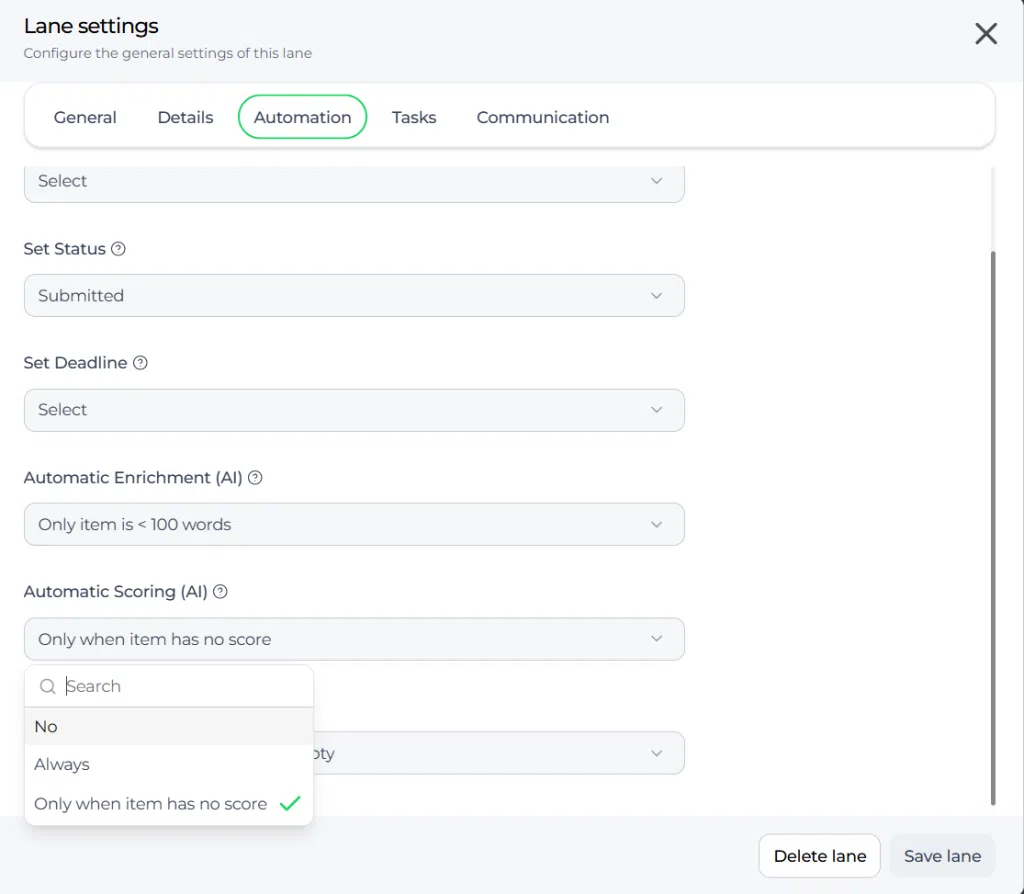
Admins can configure lanes so ideas are scored automatically when they enter a Lane. This is useful for standardizing evaluation moments in the funnel.
The available Lane behaviors are:
- No – for no automatic scoring.
- Always – for automatic scoring when ideas enter the Lane.
- Only when item has no score – to refresh existing scores with a new AI evaluation.
This setup is helpful when you want all submitted ideas to receive an initial score or when ideas enter a dedicated evaluation Lane.
Practical example – Innovationlands #
Innovationlands uses a funnel to evaluate new attraction and guest experience ideas across its parks. When ideas move into the evaluation Lane, the team uses AI scoring to assess feasibility, viability, and desirability in a consistent way.
For example, a new idea for an interactive evening attraction is submitted with a title and a detailed description. The funnel already contains context about seasonal visitor growth, guest experience goals, and operational limits. The Scorecard includes structured criteria for guest value, operational fit, and commercial potential.
When the idea enters the evaluation Lane, AI scoring is triggered automatically. The system reviews the idea, applies the Scorecard logic, and returns scores with explanations. The explanation highlights that the concept has strong guest appeal but may require additional maintenance planning and staffing.
The Innovationlands steering group uses this result to compare the idea with other concepts in the same funnel. Ideas with strong scores and clear rationale can move forward to the next Decision step, while weaker ideas can be improved before review.
Summary #
AI scoring helps teams evaluate ideas faster and with more consistency. It uses company context, funnel context, and Scorecard structure to generate scores with explanations. The feature can be used manually on individual ideas or automatically through Lane configuration, depending on how the funnel is managed.



 English
 Dutch
Dutch Portuguese
 Spanish
 French
 German
 Arabic