
 Doc Summary
Why this feature is needed #
When many ideas are submitted into a funnel, teams need a quick way to see which ideas are attracting attention from users. Without that signal, it can be harder to decide which ideas may need faster review or closer follow-up.
Engagement score helps power users identify ideas that are getting views, likes, comments, and other activity. This makes it easier to focus on ideas that are generating visible interest in the funnel.
What this feature is #
Engagement score is one of the power score filters available in an idea funnel. It reflects how much interaction an idea receives from users inside the funnel.
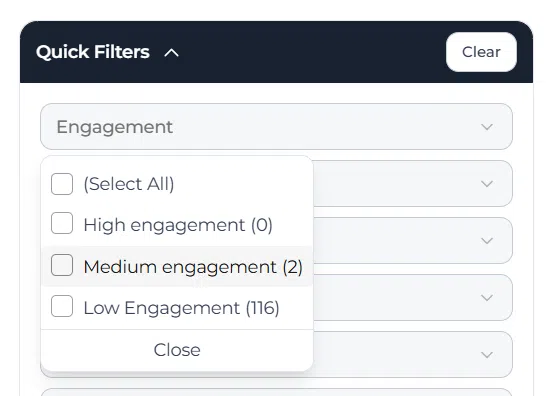
The score is based on activity such as views, likes, comments, and similar engagement signals. Ideas are then grouped into engagement levels such as high engagement, medium engagement, and low engagement.
This helps teams quickly filter the funnel and focus on ideas that are receiving the most or least attention.
Access level #
You need access to the idea funnel and its filter options to work with engagement score.
Navigation path #
Navigation path: Innovation Studio → Funnels → Open funnel → Filters
How to use this feature #
Engagement score is mainly used through the filter panel in the funnel. Instead of entering a manual score, you use the filter to narrow the funnel to ideas with a selected level of engagement.
This is useful when you want to review which ideas are getting strong user attention, which ideas have moderate traction, or which ideas have very little interaction and may need extra follow-up.
Step by step instructions #
- Open Innovation Studio.
- Go to Funnels.
- Open the funnel you want to review.
- Click Filters.
- Open the Engagement filter.
- Select one or more engagement levels, such as High engagement, Medium engagement, or Low engagement.
- Click Apply.
- Review the filtered idea set and continue with enrichment, scoring, or follow-up.
What engagement score is based on #
Engagement score is based on user interaction with an idea. This includes signals such as views, likes, comments, and related user activity in the funnel.
The more interaction an idea receives, the stronger its engagement level becomes. This gives reviewers an extra signal when deciding what to inspect first.
How engagement score appears in the funnel #
Engagement score appears as a filter in the funnel filter panel, not as a manual input field inside the idea. In the filter, ideas are grouped into engagement levels so users can quickly narrow the funnel.
This makes the feature practical during large review rounds, because you can immediately isolate highly discussed ideas or find low-engagement ideas that may need extra visibility.
How to use engagement score well #
Use engagement score as a prioritization signal, not as the only Decision factor. High engagement can indicate strong interest, but it does not automatically mean an idea is feasible or strategically relevant.
It is best to combine engagement filtering with structured review steps such as enrichment, scoring, ownership checks, and strategic evaluation.
Related power scores #
Engagement score is one of several power scores available in the funnel. Other power scores include enrichment score, idea score, Trend score, and opportunity score.
Together, these scores help teams understand idea attention, completeness, evaluation quality, and broader potential.
Configuration and adjustments #
Engagement score does not need to be filled in manually. It is generated automatically from activity around the idea.
Because it depends on user interaction, the result can be influenced by how active the campaign is, how visible the idea is, and how many users are participating in the funnel. For that reason, it should be used as a support signal rather than a final Decision rule.
The most practical use is in the funnel filters, where reviewers can quickly segment ideas by engagement level and work through them in a more focused way.
Practical example – Innovationlands #
Innovationlands is reviewing ideas in a funnel about improving guest experience during peak park hours. The innovation team wants to see which ideas are attracting the most attention from park staff and reviewers.
The team opens the funnel filters and selects High engagement in the Engagement filter. This immediately narrows the funnel to the ideas that are generating the most views, comments, and likes.
One idea about mobile queue updates appears in the filtered results because many users have interacted with it. The team uses that as a signal to review the idea first, while still checking its enrichment and scoring before moving it forward in the funnel.



 English
 Dutch
Dutch Portuguese
 Spanish
 French
 German
 Arabic