
 Doc Summary
Strategic Domains: Functional Overview #
Strategic Domains help organizations connect innovation work to the areas that matter most. They create a shared structure for showing how ideas and projects contribute to strategy, while keeping that structure practical enough for day-to-day use.
Organizations may use terms such as strategic themes, focus areas, strategic pillars, strategic priorities, innovation themes, business domains, or transformation themes. Accept Mission uses Strategic Domains as the universal feature name. The labels inside the hierarchy can be adapted to the terminology used by each organization.
Why this feature is needed #
Innovation becomes more valuable when it supports a clear strategic direction. Without a shared structure, organizations may collect many ideas and start many projects without being able to answer questions such as:
- Which strategic priorities receive the most innovation activity?
- Which areas have ideas but no projects yet?
- Which priorities are underserved?
- Where is innovation activity concentrated?
- How does an individual idea or project contribute to strategy?
- Which ideas and projects contribute to more than one area?
Strategic Domains create the connection between strategy and execution. Teams can align individual ideas and projects, then use the resulting data to review the innovation portfolio and make better decisions.
What Strategic Domains enable #
With Strategic Domains, organizations can:
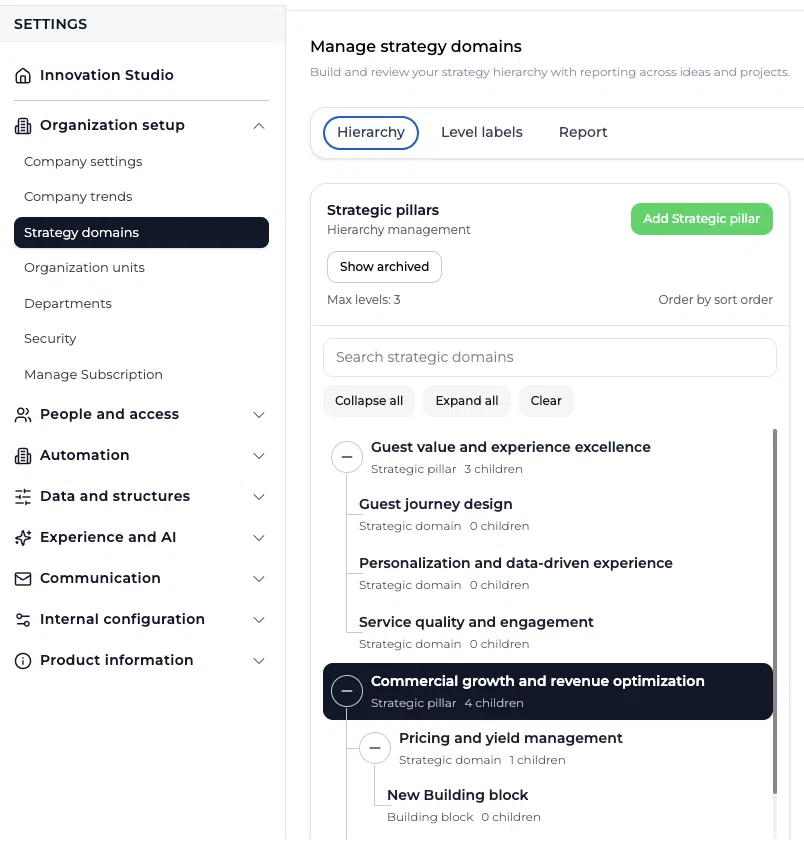
- Build a strategic hierarchy with up to three levels
- Define their own label for each level
- Assign an owner to a strategic domain
- Add a description and goals
- Connect ideas and projects to the hierarchy
- Identify one primary strategic alignment
- Add multiple secondary alignments
- Review alignment from an idea or project
- Compare activity across domains
- Report on both ideas and projects
- Distinguish direct assignments from rolled-up results
- Identify strategic areas with strong or limited innovation activity
One universal feature, flexible terminology #
Accept Mission calls the feature Strategic Domains, but organizations do not need to use that exact terminology for every hierarchy level.
A common configuration is:
- Theme
- Domain
- Building Block
Other valid examples include:
- Strategic Pillar > Focus Area > Objective
- Theme > Priority > Goal
- Business Domain > Capability > Initiative Area
- Strategic Priority > Program Area > Building Block
- Transformation Theme > Workstream > Objective
The purpose is more important than the label. The hierarchy should reflect how the organization wants to group, connect, and review innovation work.
Strategic Goals may exist as a separate strategic concept. They should not automatically be treated as categories or used interchangeably with Strategic Domains. Decide what each structure represents before configuring the hierarchy.
How the three-level hierarchy works #
Strategic Domains support a maximum of three levels.
Level 1: strategic context #
Level 1 provides the highest strategic context. It is commonly used for themes, pillars, or broad priorities.
In the Strategic Alignment selector, Level 1 acts as context. Users expand it to find the selectable items underneath it.
Level 2: strategic domain #
Level 2 contains the more specific domains or focus areas. Ideas and projects can be aligned to these items.
Level 3: strategic building block #
Level 3 provides the most detailed level. It can be used for building blocks, objectives, capabilities, or another detailed strategic subdivision. Ideas and projects can also be aligned to these items.
Keep the hierarchy understandable. Three levels are available, but an organization should only use the depth it genuinely needs.
Configure the level labels #
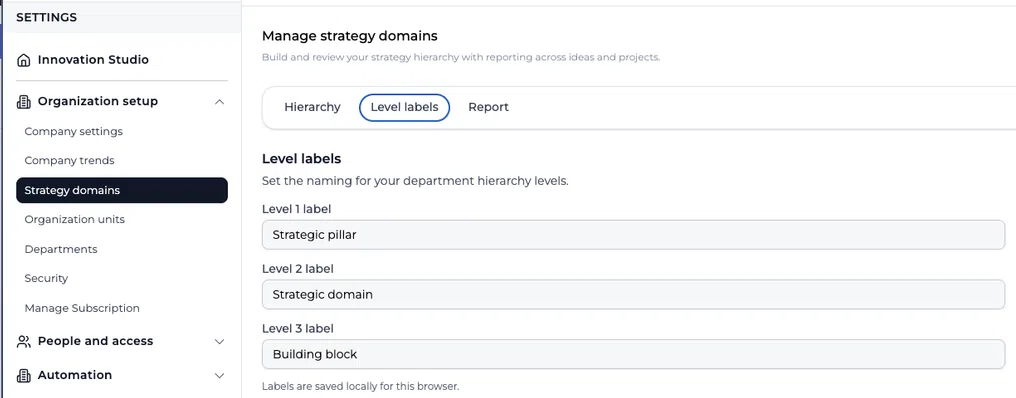
Admins can define the terminology shown for each hierarchy level.
Go to:
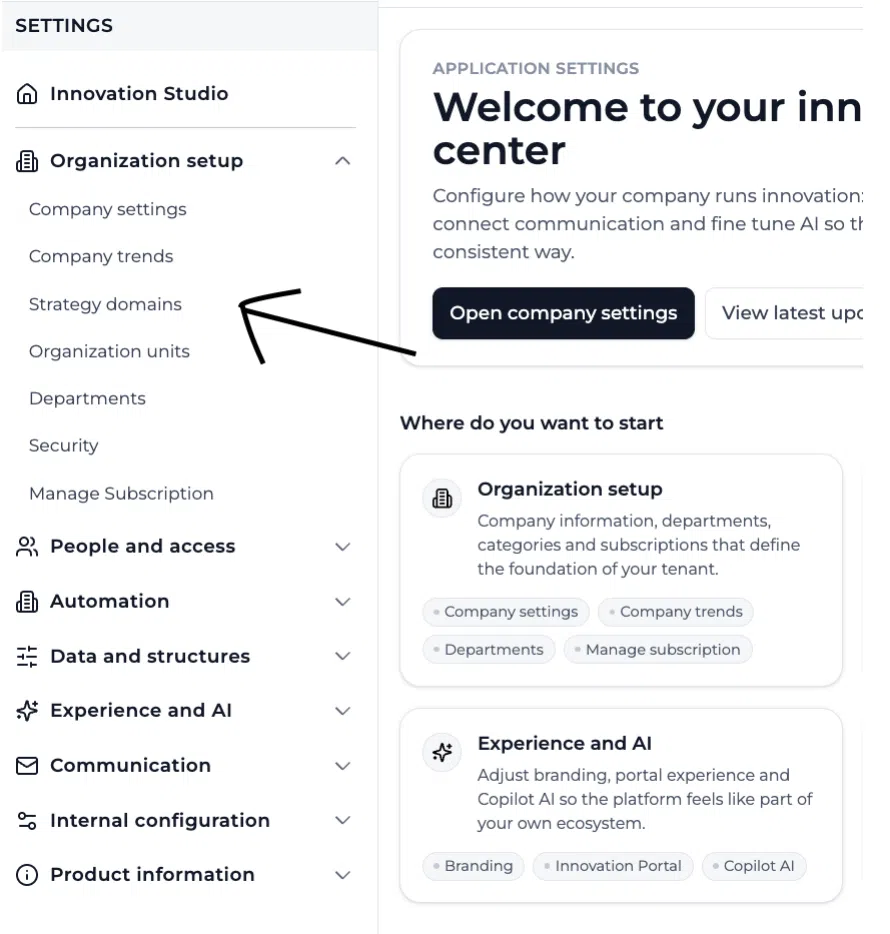
Innovation Studio > Settings > Organization Setup > Strategy Domains > Level labels
Enter a label for Level 1, Level 2, and Level 3. Choose terms that people across the organization already understand. Consistent labels make alignment easier and improve the readability of reports.
Build and manage the hierarchy #
Admins manage the hierarchy from:
Innovation Studio > Settings > Organization Setup > Strategy Domains > Hierarchy
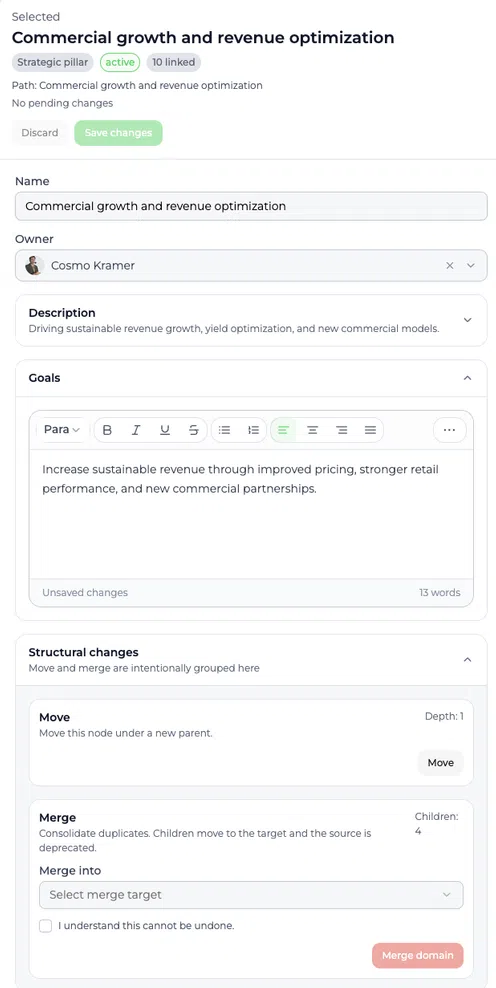
From this screen, an Admin can build and maintain the strategic structure. Depending on the selected item and its position, the management panel can be used to:
- Add a top-level item
- Add child items
- Change the name
- Assign an owner
- Add a description
- Record goals
- Reorder or move an item
- Merge duplicate items
- Archive items that should no longer be used
- Review how many items are linked
Changes to an established hierarchy can affect reporting and existing alignment. Review structural changes carefully before moving, merging, or archiving domains.
Primary and secondary strategic alignment #
An idea or project may contribute to more than one strategic area. Accept Mission supports this without making strategic reporting unnecessarily complex.
Primary alignment #
The primary alignment represents the main strategic contribution of the idea or project.
An idea or project can have only one primary alignment.
Use the primary alignment to answer:
If this item could contribute to only one strategic area, which area would it be?
Secondary alignment #
Secondary alignments represent additional strategic contributions.
An idea or project can have multiple secondary alignments. The selected primary alignment cannot also be selected as a secondary alignment.
This model creates a clear main relationship while preserving relevant cross-domain contributions.
Example #
An organization has these Strategic Domains:
- Customer Experience
- Operational Excellence
- Sustainability
An idea for predictive maintenance primarily supports Operational Excellence because its main purpose is to prevent disruption and reduce maintenance effort. If the idea also reduces material waste, Sustainability can be added as a secondary alignment.
Reporting can now show both contributions without counting two domains as the primary purpose of the idea.
Connect an idea or project to Strategic Domains #
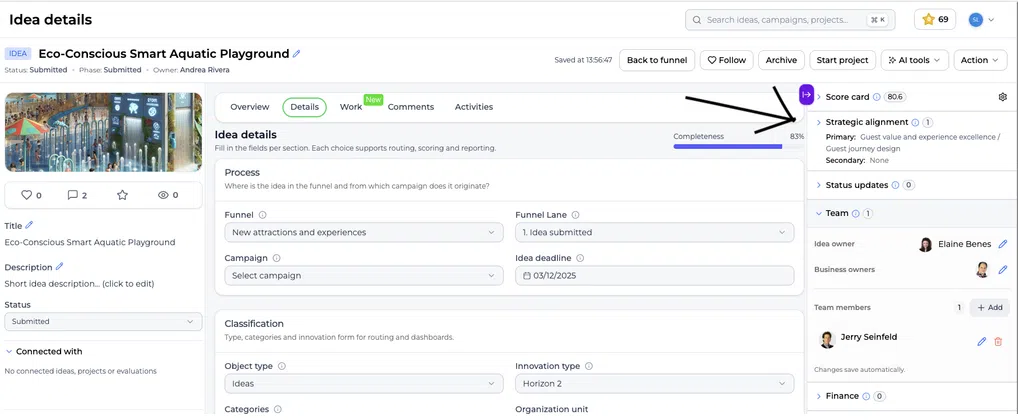
Open an idea or project in an Innovation Studio funnel. In the right-hand sidebar, open Strategic alignment.
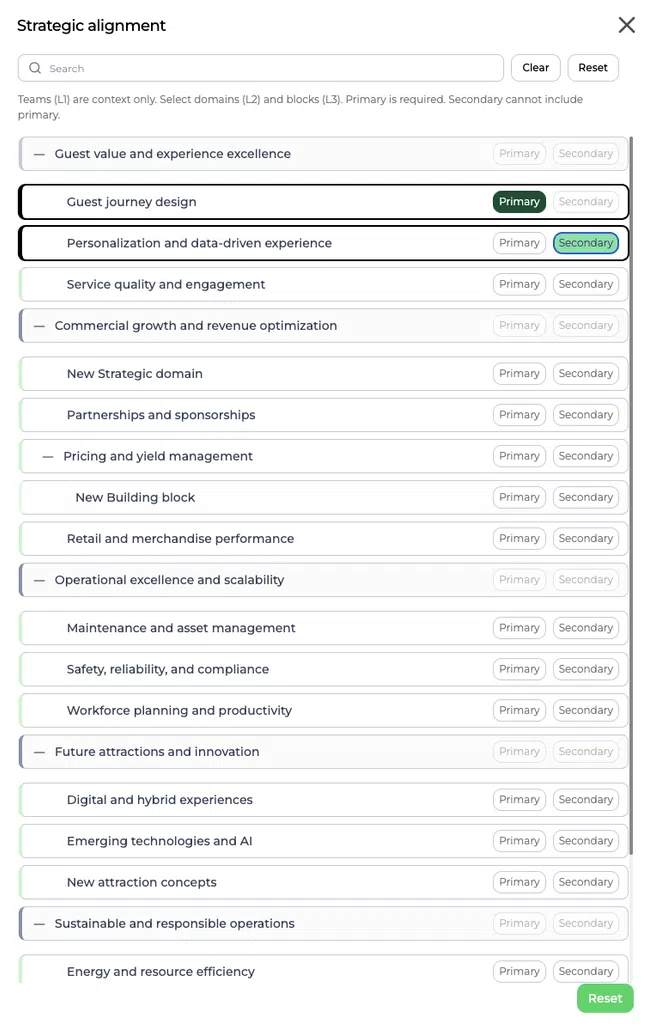
The widget shows the current primary and secondary relationships. Open the selector to search or browse the hierarchy and update the alignment.
To align the item:
- Expand a Level 1 item to view the selectable Level 2 and Level 3 items.
- Select one item as Primary.
- Add any relevant additional items as Secondary.
- Close the selector and confirm the result in the Strategic Alignment widget and the item overview.
Do not add secondary relationships simply because they are loosely related. Secondary alignment should represent a meaningful strategic contribution.
Review strategic alignment on the item overview #
The idea or project overview summarizes the selected strategic alignment. This allows reviewers to see the main strategic contribution without reopening the selector.
Strategic alignment can be considered alongside other information such as the innovation score, opportunity score, status, funnel position, owner, risks, assumptions, experiments, decisions, and lessons. This gives reviewers a broader lens for deciding whether an item deserves further investment.
Report on Strategic Domains #
Admins can review detailed reporting from:
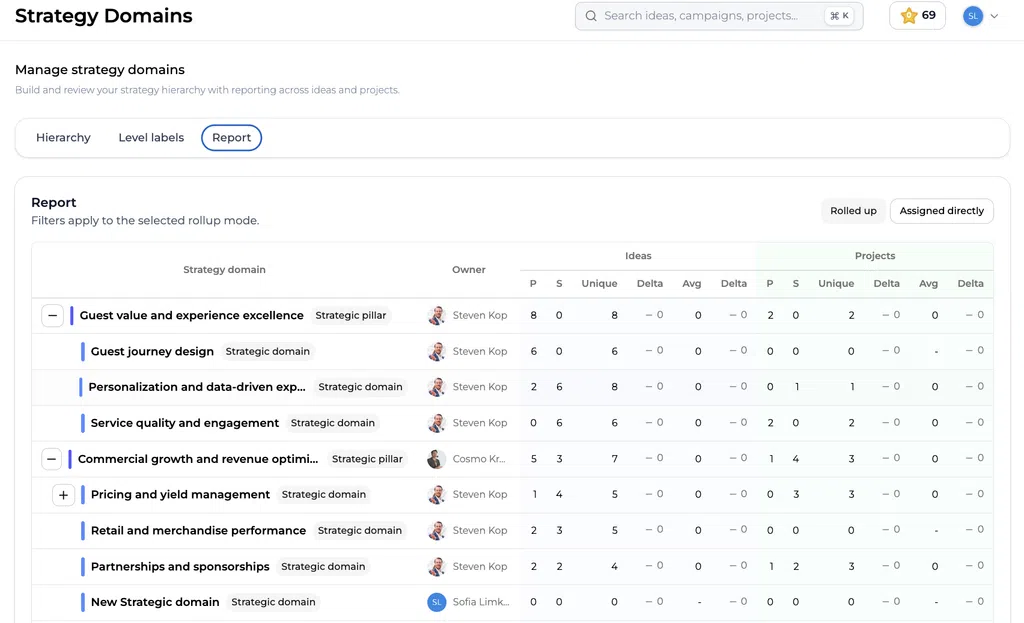
Innovation Studio > Settings > Organization Setup > Strategy Domains > Report
The report combines the configured hierarchy with alignment data from ideas and projects. It can distinguish between:
- Primary alignments
- Secondary alignments
- Unique aligned items
- Ideas and projects
- Directly assigned results
- Results rolled up through the hierarchy
- Averages and changes where available
Rolled up versus assigned directly #
Assigned directly shows the items connected directly to a particular selectable domain or building block.
Rolled up includes results from lower levels in the totals of their parent hierarchy. This is useful when leadership wants to understand total activity connected to a broader strategic theme.
Use the two modes deliberately. A rolled-up total answers a different question than a direct assignment count.
Use the Strategic Domains dashboard #
Go to:
Innovation Studio > Dashboard > Strategic domains
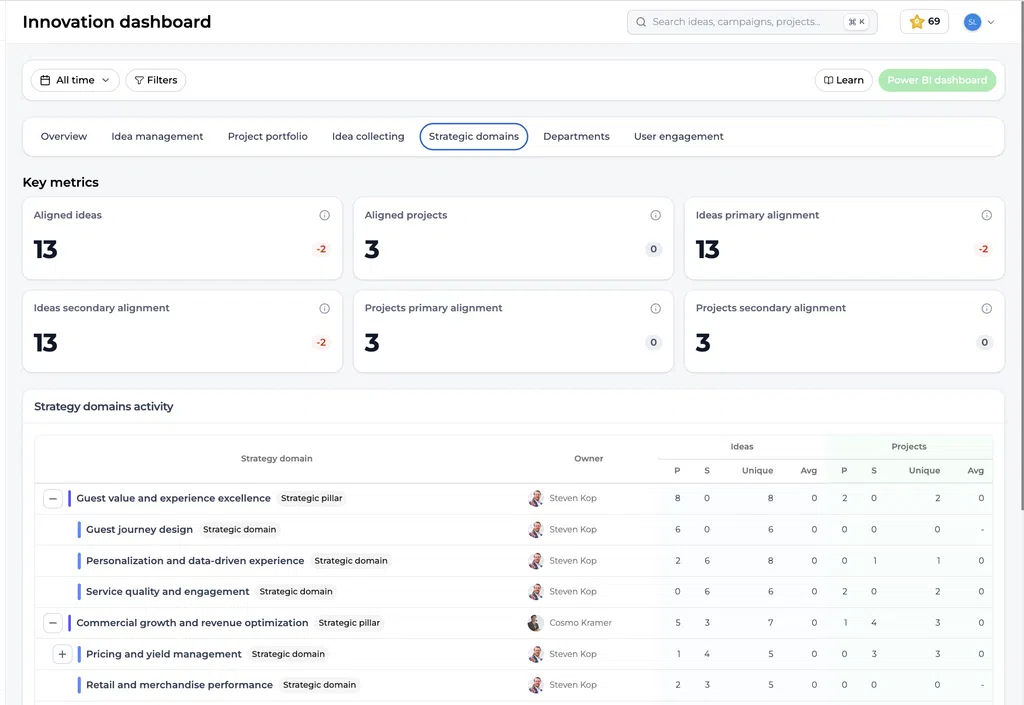
The Strategic Domains dashboard provides a portfolio-level view of strategic alignment. Depending on the available data, it can show key metrics for:
- Aligned ideas
- Aligned projects
- Primary idea alignments
- Secondary idea alignments
- Primary project alignments
- Secondary project alignments
- Activity for each strategic domain and hierarchy level
Use the date selector and available filters to focus the analysis on a relevant period, funnel, department, or other available dimension.
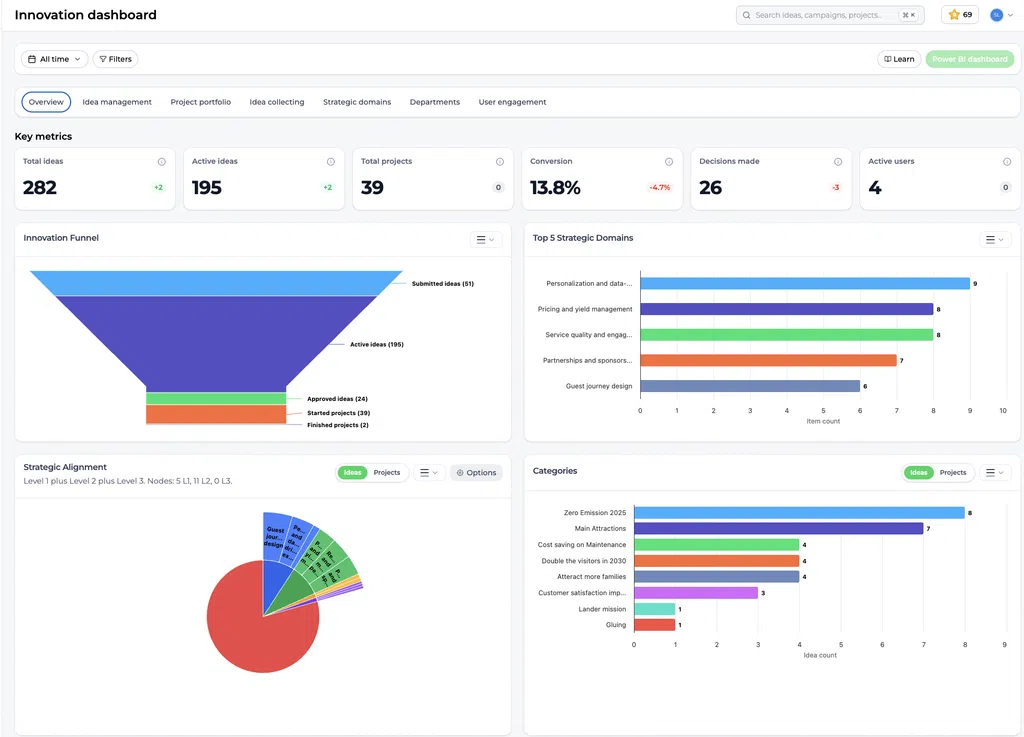
The general dashboard can also show strategic information such as a Top Strategic Domains chart and a Strategic Alignment visualization. These elements help teams compare strategic activity with the wider Innovation Funnel and portfolio.
Practical examples #
Example 1: University innovation portfolio #
A university defines:
- Strategic Theme: Student Success
- Focus Area: Learning Experience
- Building Block: Digital and Flexible Learning
An idea for an AI-supported study assistant is primarily aligned with Digital and Flexible Learning. Student Wellbeing is added as a secondary alignment when the concept also helps students manage study pressure.
The innovation team can use the dashboard to see whether Student Success attracts enough ideas and whether approved ideas are progressing into projects.
Example 2: Public-sector service improvement #
A public organization defines:
- Strategic Theme: Accessible Services
- Domain: Digital Interaction
- Objective: First-Time-Right Service
A project that redesigns an online permit process is primarily aligned with First-Time-Right Service and secondarily aligned with Operational Efficiency.
Reporting reveals whether the strategy is supported only by early-stage ideas or also by active implementation projects.
Example 3: Sustainability and operations #
A manufacturing company defines:
- Strategic Pillar: Sustainable Operations
- Focus Area: Circular Production
- Building Block: Material Reuse
An idea to reuse production residue is primarily aligned with Material Reuse. If it also reduces operating costs, Cost Efficiency can be selected as a secondary alignment.
The company can compare the number of ideas, started projects, and completed projects contributing to Sustainable Operations.
Example 4: Customer-focused innovation #
A service provider defines:
- Theme: Customer Value
- Domain: Digital Service
- Building Block: Self-Service
A new customer portal is primarily aligned with Self-Service and secondarily aligned with Data-Driven Service.
The primary relationship makes the main objective clear. The secondary relationship preserves the additional strategic benefit for portfolio analysis.
Recommended setup approach #
Before configuring Strategic Domains:
- Agree on the purpose of the hierarchy.
- Decide what each level represents.
- Use terminology already recognized inside the organization.
- Keep the number of top-level items limited and meaningful.
- Define when users should choose a primary or secondary alignment.
- Assign owners who can review their part of the hierarchy.
- Test the structure with several real ideas and projects.
- Review the resulting reports before applying the structure broadly.
Avoid copying an entire strategy document into the hierarchy. Strategic Domains should help people classify and analyze innovation work, not reproduce every strategic sentence or KPI.
Strategic Domains compared with other structures #
| Structure | Main purpose |
|---|---|
| Strategic Domains | Connect ideas and projects to strategic direction and report on that contribution |
| Strategic Goals | Describe specific intended strategic outcomes where this separate feature is used |
| Categories | Group ideas or projects by topic for organization, filtering, and discovery |
| Departments | Show which organizational department is involved or responsible |
| Organization units | Represent the organizational hierarchy |
| Tags | Add flexible labels for search, grouping, and analysis |
| Funnels | Manage the workflow through which ideas or projects progress |
Do not use categories as a replacement for Strategic Domains when the goal is to create formal strategic alignment and dedicated reporting.
Governance and maintenance #
Review the hierarchy periodically, especially when the organizational strategy changes.
A practical governance approach is to:
- Assign an owner to each important domain
- Limit structural editing to responsible admins
- Review unused or overloaded domains
- Check whether users apply primary and secondary alignment consistently
- Archive outdated items instead of leaving them available
- Merge duplicates carefully
- Explain structural changes to users
- Review dashboard coverage and gaps during portfolio meetings
Changing the hierarchy without governance can fragment historical reporting or make alignment inconsistent.
Summary #
Strategic Domains connect innovation activity to organizational strategy. Organizations can configure a three-level hierarchy using their own terminology, then connect ideas and projects through one primary and multiple secondary alignments.
The resulting data creates a strategic lens across individual items, the hierarchy report, and the Innovation Dashboard. This helps teams understand where innovation activity is concentrated, where gaps remain, and how ideas are progressing into projects that support strategic priorities.
The structure should remain clear, governed, and practical. Its value comes not from the number of domains created, but from the quality and consistency of the alignment decisions.



 English
 Dutch
Dutch Portuguese
 Spanish
 French
 German
 Arabic